Epson SureColor F170 Dye-Sublimation Printer – 8.5-Inch Desktop, 140 mL Ink Bottles, Wi-Fi and Ethernet

SKU: EPSON-SURECOLOR-F170
  • 30-Day Hassle Free Returns
  • Secure Payment Options

Price on RequestRequest a quote for volume pricing, availability and lead time.

Key Value Highlights

  • Purpose-built dye-sublimation – Uses genuine Epson dye-sub ink, with no converted-printer workarounds.
  • 140 mL T49M ink bottles – Supply high-capacity refills with auto-stop filling.
  • 150-sheet auto-feed tray – Supports production runs of transfer sheets.
  • PrecisionCore printhead, up to 1200 x 600 dpi – Produces sharp, saturated transfers.
  • USB, Ethernet, and Wi-Fi – Fits home studios and small shops.

Description

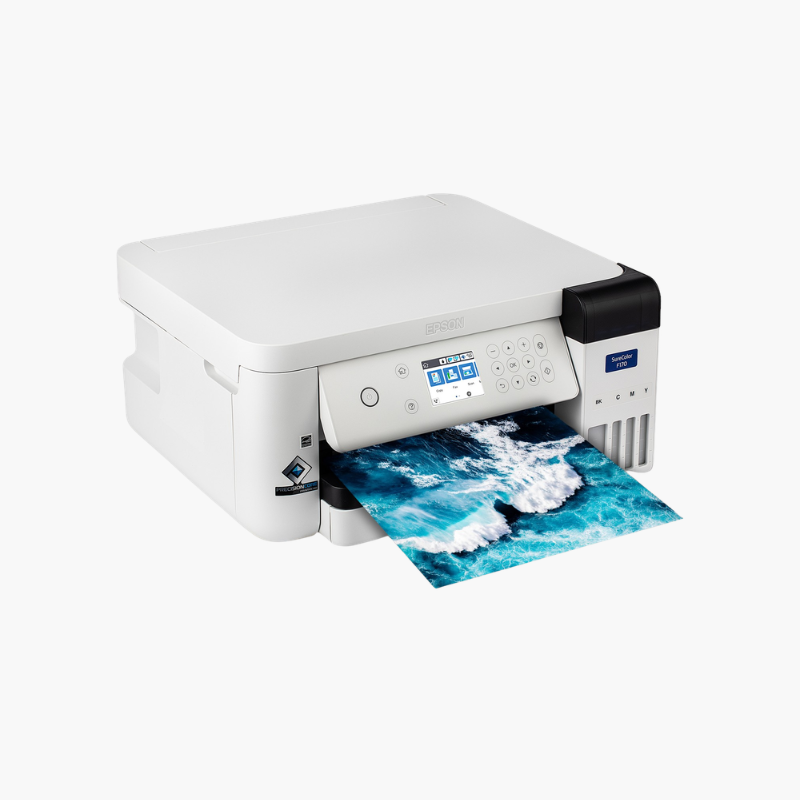
The Epson SureColor F170 is a desktop dye-sublimation printer for custom merchandise makers, crafters, and small print shops. It prints transfers up to 8.5 inches wide using Epson T49M dye-sub ink for mugs, apparel, mousepads, and other polyester-coated items sold to order.

Deep-Dive Story & Problem/Solution

Converted Inkjets Make Dye-Sublimation Unpredictable

Many people start sublimation by filling a standard inkjet with third-party dye-sub ink. Color is inconsistent, nozzles clog, and there is no manufacturer support when something goes wrong.

The SureColor F170 is designed for sublimation from the ground up. Epson T49M ink, a PrecisionCore microTFP printhead, and included print software are tuned to work together, so colors transfer as expected.

Ink comes in 140 mL bottles with an auto-stop design that fills each tank without spills. Variable-sized droplet technology and resolution up to 1200 x 600 dpi produce detailed, vivid transfers.

Consistent Color for Custom Products

The 784-nozzle printhead lays down ink evenly for photographic images and solid brand colors on rigid and soft polyester substrates.

Compact Production Tool

A 150-sheet tray handles letter-size transfer paper, and sheets up to 47.2 inches long are supported. The 2.4-inch LCD and 10.2 lb body suit small workspaces.

Setup Instructions

How to Set Up the Epson SureColor F170

  1. Remove packaging and fill the four ink tanks from the T49M bottles.
  2. Power on and allow the ink charging process to complete.
  3. Install the Epson print software and driver on your Mac or Windows computer.
  4. Load dye-sublimation transfer paper and print a nozzle check before your first design.

Overview

ModelEpson SureColor F170
Printer TypeDesktop dye-sublimation printer
PrintheadPrecisionCore microTFP, 784 nozzles
InkEpson T49M dye-sublimation, 4-color CMYK
Ink Bottle Capacity140 mL per color
Maximum Print Width8.5 inches
Maximum Sheet Length47.2 inches
Paper Tray150-sheet auto-feed
Print ResolutionUp to 1200 x 600 dpi
ConnectivityUSB, Ethernet, Wi-Fi, Wi-Fi Direct
Display2.4-inch color LCD
SoftwareEpson dye-sublimation print software for Mac and Windows
Dimensions14.8 x 19.8 x 7.4 inches (printing)
Weight10.2 lbs
In the BoxPrinter, T49M CMYK ink bottles, tray, software, documentation

Frequently Asked Questions

Find answers to common questions about this product.

Customer Reviews

Reviews

There are no reviews yet.

Be the first to review “Epson SureColor F170 Dye-Sublimation Printer – 8.5-Inch Desktop, 140 mL Ink Bottles, Wi-Fi and Ethernet”

Your email address will not be published. Required fields are marked *