HP LaserJet Enterprise M607n Monochrome Laser Printer – 55 ppm, Built-in Ethernet, 650-Sheet Input
HP LaserJet Enterprise M607n Monochrome Laser Printer – 55 ppm, Built-in Ethernet, 650-Sheet Input Price on RequestRequest a quote for volume pricing, availability and lead time.
Back to products
HP OfficeJet Pro 9125e Wireless Color Inkjet All-in-One Printer – Print, Copy, Scan, Fax, Duplex ADF
HP OfficeJet Pro 9125e Wireless Color Inkjet All-in-One Printer – Print, Copy, Scan, Fax, Duplex ADF Price on RequestRequest a quote for volume pricing, availability and lead time.

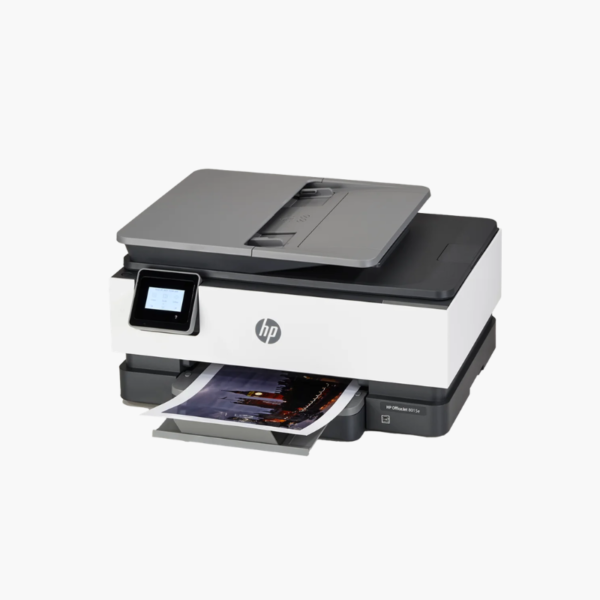
HP OfficeJet 8015e Wireless Color Inkjet All-in-One Printer – Print, Copy, Scan, 35-Page ADF, Auto Duplex

SKU: HP-OFFICEJET-8015E
  • 30-Day Hassle Free Returns
  • Secure Payment Options

Price on RequestRequest a quote for volume pricing, availability and lead time.

Key Value Highlights

  • 18 ppm black, 10 ppm color – Prints home-office documents promptly.
  • 35-page automatic document feeder – Scans and copies multi-page files hands-free.
  • Automatic two-sided printing – Saves paper.
  • 225-sheet input tray – Holds nearly half a ream.
  • Wi-Fi with 2.2-inch color touchscreen – Allows easy setup and mobile printing.

Description

The HP OfficeJet 8015e is a wireless color inkjet all-in-one for home offices that need dependable everyday printing. It prints, copies, and scans, with a 35-page ADF, automatic duplex, and a 225-sheet tray managed from a 2.2-inch color touchscreen or the HP Smart app.

Deep-Dive Story & Problem/Solution

Working From Home Needs More Than a Basic Family Printer

A home office prints invoices, scans receipts, and copies signed forms daily. Entry-level family printers with 60-sheet trays and no feeder turn each task into manual work.

The OfficeJet 8015e brings office paper handling to a home-friendly size: a 225-sheet tray, a 35-page ADF, and automatic duplex printing.

It prints at up to 18 ppm in black and 10 ppm in color with resolution up to 4800 x 1200 dpi, and is rated for a recommended 800 pages a month.

Home-Office Productivity

Scan at 1200 dpi optical from the flatbed or feed stacks through the ADF. Shortcuts in the HP Smart app automate repeat scan and copy tasks.

Simple Wireless Operation

Self-healing Wi-Fi keeps the connection stable, and mobile printing is supported from phones, tablets, and Chromebooks.

Setup Instructions

How to Set Up the HP OfficeJet 8015e

  1. Remove packing materials and power on.
  2. Install the four ink cartridges and load paper.
  3. Connect using the HP Smart app.
  4. Print and scan the alignment page.

Overview

ModelHP OfficeJet 8015e
FunctionsPrint, copy, scan
Print TechnologyHP Thermal Inkjet, 4 individual cartridges
Print SpeedUp to 18 ppm black, 10 ppm color
Print ResolutionUp to 4800 x 1200 dpi
Monthly Duty CycleUp to 20, 000 pages
Paper Input225 sheets
Automatic Document Feeder35 pages
Duplex PrintingAutomatic
Scan Resolution1200 dpi optical
ConnectivityWi-Fi, USB
Control Panel2.2-inch color touchscreen
InkHP 910 / 910XL (black, cyan, magenta, yellow)
Dimensions and Weight18.1 x 13.3 x 9.2 inches; 18.1 lbs
MaintenanceReplace individual cartridges; clean scanner glass periodically

Frequently Asked Questions

Find answers to common questions about this product.

Customer Reviews

Reviews

There are no reviews yet.

Be the first to review “HP OfficeJet 8015e Wireless Color Inkjet All-in-One Printer – Print, Copy, Scan, 35-Page ADF, Auto Duplex”

Your email address will not be published. Required fields are marked *