Epson EcoTank Photo ET-8500 Wireless Color All-in-One Supertank Printer – 6-Color Ink, Scanner, Copier, Ethernet

SKU: EPSON-ECOTANK-PHOTO-ET-8500
  • 30-Day Hassle Free Returns
  • Secure Payment Options

Price on RequestRequest a quote for volume pricing, availability and lead time.

Key Value Highlights

  • 6-color Claria ET Premium ink – Delivers rich color and smooth black-and-white photos.
  • 4 x 6-inch photo in about 15 seconds – Prints snapshots quickly.
  • Cartridge-free supertank – Makes frequent photo printing affordable.
  • Borderless prints up to 8.5 x 14 inches – Covers standard photo and document sizes.
  • 4.3-inch touchscreen with Wi-Fi, Ethernet, and card slots – Supports direct printing.

Description

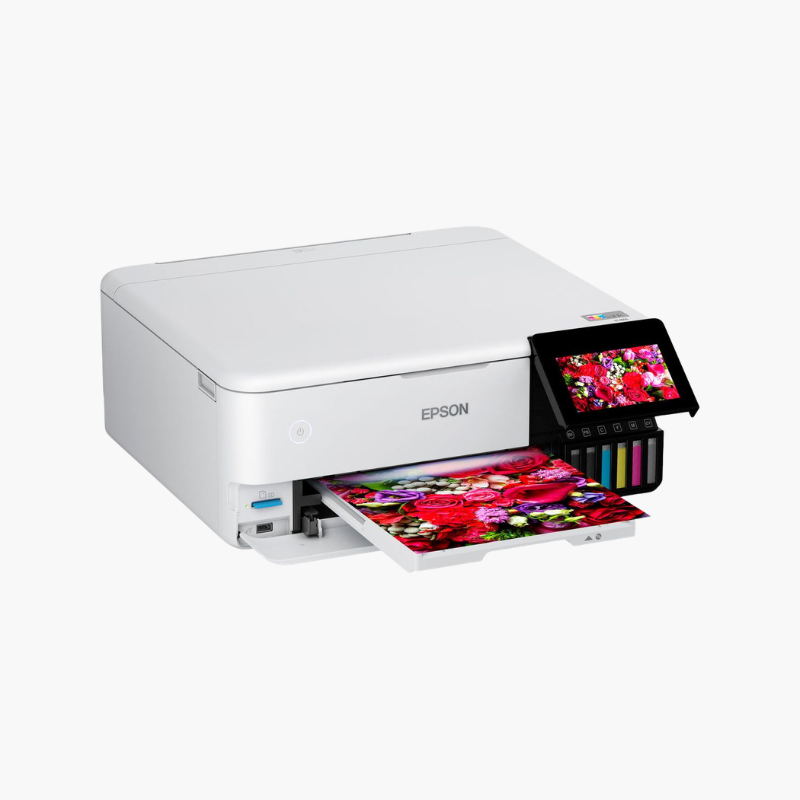
The Epson EcoTank Photo ET-8500 is a wireless color all-in-one supertank printer for photo enthusiasts and creative households. It uses six Claria ET Premium inks for lab-quality photos up to 8.5 x 14 inches, and includes a flatbed scanner and copier.

Deep-Dive Story & Problem/Solution

Printing Lots of Photos at Home Empties Cartridges in Days

Anyone who prints albums, craft projects, or client proofs knows how quickly photo cartridges run out. The cost per print often exceeds what an online lab charges.

The ET-8500 changes the economics with bottle-fed tanks. A replacement set of Claria ET Premium ink is equivalent to about 100 individual cartridges, so photo printing at home becomes routine.

Six inks, including photo black and gray, improve tonal range. Output reaches 5760 x 1440 dpi, with a 4 x 6-inch photo in around 15 seconds and document speeds of 16 ppm black and 12 ppm color.

Lab-Quality Photos at Low Cost

Borderless printing is supported up to 8.5 x 14 inches, and three input trays keep photo and plain paper ready.

Compact Creative Hub

An 8.5 x 11.7-inch flatbed scans at 1200 x 4800 dpi. USB, Ethernet, Wi-Fi, SD card, and USB memory slots allow printing without a computer.

Setup Instructions

How to Set Up the Epson EcoTank Photo ET-8500

  1. Remove packaging and fill the six ink tanks from their bottles.
  2. Start ink charging from the touchscreen.
  3. Load photo paper and plain paper in their trays.
  4. Connect to the network and print a nozzle check pattern.

Overview

ModelEpson EcoTank Photo ET-8500
FunctionsPrint, scan, copy
Ink System6-color Claria ET Premium
Ink ColorsBlack, photo black, gray, cyan, magenta, yellow
Print Speed16 ppm black, 12 ppm color
Photo Print Speed4 x 6 inches in approx. 15 seconds
Print Resolution5760 x 1440 dpi
Maximum Print Size8.5 x 14 inches borderless
Paper PathsThree input trays
Duplex PrintingAutomatic
Scanner8.5 x 11.7-inch flatbed, 1200 x 4800 dpi
ConnectivityWi-Fi, Ethernet, USB, SD and USB memory slots
Control Panel4.3-inch color touchscreen
Dimensions and Weight15.9 x 13.7 inches footprint; 18.5 lbs
MaintenanceRefill tanks from bottles; replace maintenance box when prompted

Frequently Asked Questions

Find answers to common questions about this product.

Customer Reviews

Reviews

There are no reviews yet.

Be the first to review “Epson EcoTank Photo ET-8500 Wireless Color All-in-One Supertank Printer – 6-Color Ink, Scanner, Copier, Ethernet”

Your email address will not be published. Required fields are marked *