HP Color LaserJet Pro MFP 4301fdw Wireless Color Laser All-in-One – Print, Scan, Copy, Fax, 35 ppm
HP Color LaserJet Pro MFP 4301fdw Wireless Color Laser All-in-One – Print, Scan, Copy, Fax, 35 ppm Price on RequestRequest a quote for volume pricing, availability and lead time.
Back to products
HP Smart Tank 5000 Wireless All-in-One Ink Tank Printer – Print, Copy, Scan, Refillable High-Capacity Tanks
HP Smart Tank 5000 Wireless All-in-One Ink Tank Printer – Print, Copy, Scan, Refillable High-Capacity Tanks Price on RequestRequest a quote for volume pricing, availability and lead time.

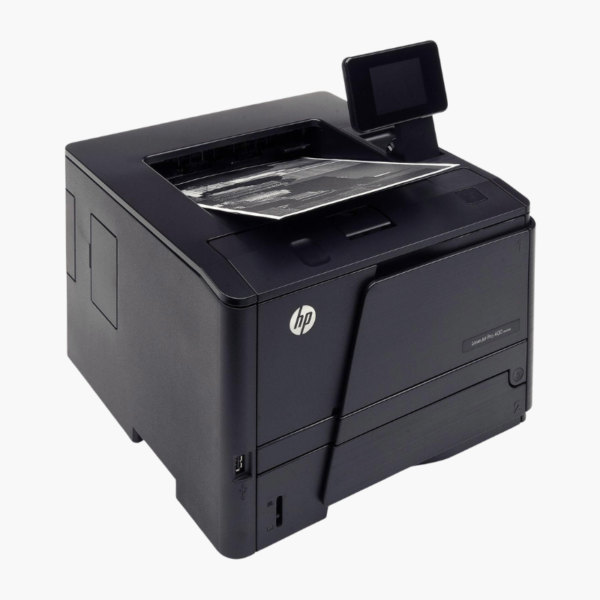
HP LaserJet Pro 4001dn Monochrome Laser Printer – 42 ppm, Auto Duplex, Ethernet for Small Teams

SKU: HP-LASERJET-PRO-4001DN
  • 30-Day Hassle Free Returns
  • Secure Payment Options

Price on RequestRequest a quote for volume pricing, availability and lead time.

Key Value Highlights

  • 42 ppm with 6.1-second first page – Gets documents out fast for shared use.
  • Ethernet and USB connectivity – Provides a stable, wired connection for secure office networks.
  • 350-sheet input (100 + 250) – Supports envelopes or labels in the multipurpose tray.
  • Automatic duplex printing – Reduces paper consumption on every job.
  • HP 148X high-yield toner (about 9,500 pages) – Extends the time between cartridge changes.

Description

The HP LaserJet Pro 4001dn is a wired monochrome laser printer for small teams that want speed and network reliability. It prints 42 pages per minute, duplexes automatically, holds 350 sheets as standard, and connects over Ethernet or USB for a stable office link.

Deep-Dive Story & Problem/Solution

Wireless Convenience Is Not Always What an Office Network Needs

In many offices the printer sits next to a network switch, and IT prefers every device on a cable. Wi-Fi printers on such networks add configuration effort and one more wireless device to secure and troubleshoot.

The 4001dn keeps it simple with Ethernet and USB only. It joins the wired network like any other managed device and stays reachable without wireless dropouts.

Performance matches larger workgroup printers: 42 ppm, a first page in about 6.1 seconds, 1200 x 1200 dpi resolution, and a monthly duty cycle of up to 80,000 pages.

Fast Monochrome Output for Shared Use

Automatic two-sided printing is standard. The 100-sheet multipurpose tray and 250-sheet main tray feed a 150-sheet output bin, and optional trays can extend capacity.

Compact and Economical to Run

The printer measures about 15 x 14 x 8.5 inches and weighs under 19 lbs. HP 148A and 148X cartridges provide yields of roughly 2,900 and 9,500 pages.

Setup Instructions

How to Set Up the HP LaserJet Pro 4001dn

  1. Unpack the printer and remove tape and the toner sealing strip.
  2. Load paper into the 250-sheet tray and connect the power cord.
  3. Plug an Ethernet cable into your router or switch, or connect by USB.
  4. Install the HP driver, add the printer by its network address, and print a test page.

Overview

ModelHP LaserJet Pro 4001dn
FunctionsPrint
Print TechnologyMonochrome laser
Print SpeedUp to 42 ppm
First Page OutApprox. 6.1 seconds
Print Resolution1200 x 1200 dpi
Monthly Duty CycleUp to 80, 000 pages
Paper Input100-sheet multipurpose tray + 250-sheet tray
Output Capacity150 sheets
Duplex PrintingAutomatic
ConnectivityEthernet, USB
WirelessNot included
TonerHP 148A (approx. 2, 900 pages), HP 148X (approx. 9, 500 pages)
Maximum Paper Size8.5 x 14 inches (legal)
Dimensions and Weight15 x 14 x 8.5 inches; 18.87 lbs
MaintenanceReplace toner cartridge when prompted

Frequently Asked Questions

Find answers to common questions about this product.

Customer Reviews

Reviews

There are no reviews yet.

Be the first to review “HP LaserJet Pro 4001dn Monochrome Laser Printer – 42 ppm, Auto Duplex, Ethernet for Small Teams”

Your email address will not be published. Required fields are marked *