HPE Ethernet 10Gb 2-Port 570FLB Adapter (718939-B21) – FlexibleLOM for ProLiant BladeSystem, 730701-001
HPE Ethernet 10Gb 2-Port 570FLB Adapter (718939-B21) – FlexibleLOM for ProLiant BladeSystem, 730701-001 Price on RequestRequest a quote for volume pricing, availability and lead time.
Back to products
Dell THGMP Intel I350-T4 Quad-Port 1GbE PCIe Server Network Adapter – 4x RJ-45, PCIe 2.1 x4
Dell THGMP Intel I350-T4 Quad-Port 1GbE PCIe Server Network Adapter – 4x RJ-45, PCIe 2.1 x4 Price on RequestRequest a quote for volume pricing, availability and lead time.

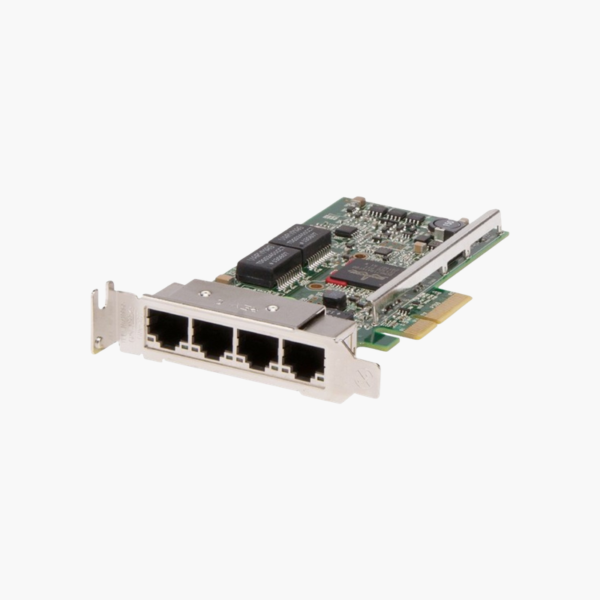
Dell 540-BBHB Broadcom 5719 Quad-Port 1GbE PCIe Network Interface Card – 4x RJ-45, PCIe 2.0 x4

SKU: Dell Broadcom 5719
  • 30-Day Hassle Free Returns
  • Secure Payment Options

Price on RequestRequest a quote for volume pricing, availability and lead time.

Key Value Highlights

  • 4 x 1GbE RJ-45 ports – Adds four Gigabit connections for management, storage, backup and production networks.
  • Broadcom BCM5719 controller – A widely supported server Ethernet controller with mature drivers.
  • PCIe 2.0 x4 interface – Fits standard PCIe x4, x8 or x16 slots in Dell PowerEdge servers.
  • Teaming and VLAN support – Combine ports for bandwidth and failover, or assign them to separate VLANs.
  • PXE boot and Wake-on-LAN – Supports network deployment and remote power management.

Description

Four Gigabit ports in one slot for network separation, teaming and appliances.

The Dell 540-BBHB is a quad-port Gigabit Ethernet network interface card based on the Broadcom BCM5719 controller, with four RJ-45 ports on a PCIe 2.0 x4 interface. It suits Dell PowerEdge servers that need extra ports for virtualization, network separation, teaming or appliance roles.

Why Servers Run Out of Network Ports

Firewalls, virtualization hosts and multi-homed servers often need more network ports than the onboard LAN provides, for separate management, storage, backup and production networks.

The 540-BBHB adds four Gigabit RJ-45 ports in a single PCIe slot. Ports can be teamed for bandwidth and failover, or assigned to separate VLANs and virtual switches.

It uses standard drivers supported by major operating systems and hypervisors, so it drops into existing builds with minimal configuration.

Key Features and Offloads

The 540-BBHB supports broadcom BCM5719 controller, TCP/IP checksum offload, Wake-on-LAN, PXE boot, teaming and VLAN tagging. These capabilities reduce CPU overhead and improve consistency for virtualization hosts, firewalls and multi-network servers.

Installation and Compatibility

It connects through a PCI Express 2.0 x4 and is designed for Dell PowerEdge servers with a free PCIe x4 (or wider) slot. Supported media: cat5e/Cat6 copper.

How to Install the Dell 540-BBHB

  1. Power down the server, disconnect power, and open the chassis following the server documentation.
  2. Install the adapter in a free 2.0 x4 or wider slot and secure the bracket.
  3. Connect cables or transceivers (Cat5e/Cat6 copper) to your switch, then power on the server.
  4. Install or update the latest drivers and firmware for your operating system or hypervisor, then configure IP addressing, teaming, VLANs or RDMA as needed.

Overview

Model Number540-BBHB
Product TypeQuad-port Gigabit Ethernet server NIC
Ports4 x 1GbE RJ-45 (1000BASE-T)
Data Rate1 Gbps per port
Host InterfacePCI Express 2.0 x4
Compatible SystemsDell PowerEdge servers with a free PCIe x4 (or wider) slot
Media / CablingCat5e/Cat6 copper
Key FeaturesBroadcom BCM5719 controller, TCP/IP checksum offload, Wake-on-LAN, PXE boot, teaming, VLAN tagging
Controller / Part InfoBroadcom 5719 chipset
Hot-SwappableNo (install with system powered off)
Operating SystemsWindows Server, Linux, VMware ESXi (driver dependent)
Form Factor DetailsPCIe add-in card

Frequently Asked Questions

Find answers to common questions about this product.

Customer Reviews

Reviews

There are no reviews yet.

Be the first to review “Dell 540-BBHB Broadcom 5719 Quad-Port 1GbE PCIe Network Interface Card – 4x RJ-45, PCIe 2.0 x4”

Your email address will not be published. Required fields are marked *