NETGEAR WBE710 Tri-Band Wi-Fi 7 Insight Managed Access Point (WBE710-100NAS) – 2.5G RJ45, PoE
NETGEAR WBE710 Tri-Band Wi-Fi 7 Insight Managed Access Point (WBE710-100NAS) – 2.5G RJ45, PoE Price on RequestRequest a quote for volume pricing, availability and lead time.
Back to products
TP-Link Archer AX10 AX1500 Wi-Fi 6 Router (ARCHER AX10) – Gigabit WAN
TP-Link Archer AX10 AX1500 Wi-Fi 6 Router (ARCHER AX10) – Gigabit WAN Price on RequestRequest a quote for volume pricing, availability and lead time.

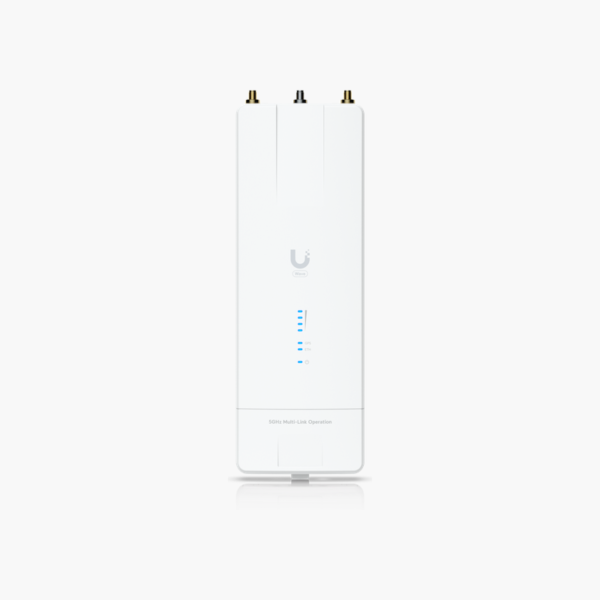
Ubiquiti UISP Wave MLO5 Wi-Fi 7 Point-to-Point Radio (WAVE-MLO5) – 10G SFP+ and 10GbE RJ45, PoE / DC

SKU: WAVE-MLO5
  • 30-Day Hassle Free Returns
  • Secure Payment Options

Price on RequestRequest a quote for volume pricing, availability and lead time.

Key Value Highlights

  • Dual 5 GHz Wi-Fi 7 radios with Multi-Link Operation – Long-range, high-throughput wireless links.
  • 10G SFP+ and 10GbE RJ45 uplink – Wired backhaul that keeps up with the wireless speed.
  • PoE / DC power – Install on ceilings or masts without a nearby outlet.
  • Point-to-point and point-to-multipoint links – Simplifies deployment and management.
  • Up to 100 km range – Keeps performance steady as more users connect.

Description

The Ubiquiti UISP Wave MLO5 Wi-Fi 7 Point-to-Point Radio is a wireless bridge radio with Dual 5 GHz Wi-Fi 7 radios with Multi-Link Operation and a 10G SFP+ and 10GbE RJ45 uplink, powered by PoE / DC. It is built for wireless backhaul between buildings and towers. Point-to-point and point-to-multipoint links and up to 100 km range simplify deployment.

Strong, reliable wireless where you need it.

High-Capacity Wireless Links Between Sites

Running fiber between buildings or towers is slow and expensive, and leased lines add monthly cost.

The Ubiquiti UISP Wave MLO5 Wi-Fi 7 Point-to-Point Radio uses Dual 5 GHz Wi-Fi 7 radios with Multi-Link Operation with a 10G SFP+ and 10GbE RJ45 wired uplink to deliver high-capacity links over long distances.

Wireless Performance

Dual 5 GHz Wi-Fi 7 radios with Multi-Link Operation delivers high throughput and better efficiency with modern clients.

Installation and Management

Powered by PoE / DC through the network cable. Point-to-point and point-to-multipoint links and Up to 100 km range.

Setup Instructions

How to Install the Ubiquiti UISP Wave MLO5 Wi-Fi 7 Point-to-Point Radio

  1. Mount the unit on the ceiling, wall or mast using the included bracket.
  2. Connect it to a PoE switch or injector with an Ethernet cable.
  3. Adopt it in the vendor’s controller, app or cloud platform.
  4. Set the network name, security and channel settings, then test coverage.

Overview

BrandUbiquiti
ModelUISP Wave MLO5 Wi-Fi 7 Point-to-Point Radio
Product TypeWireless Bridge Radio
Wi-FiDual 5 GHz Wi-Fi 7 radios with Multi-Link Operation
PowerPoE / DC
FeaturesPoint-to-point and point-to-multipoint links; Up to 100 km range
MountingPole/mast mount
ManagementVendor controller, app or cloud
SecurityWPA2/WPA3 (model dependent)
Use CasePoint-to-point links
CategoryWireless Networking
Part NumberWAVE-MLO5
ConditionBrand New
In the BoxUnit, mounting bracket, quick start guide

Frequently Asked Questions

Find answers to common questions about this product.

Customer Reviews

Reviews

There are no reviews yet.

Be the first to review “Ubiquiti UISP Wave MLO5 Wi-Fi 7 Point-to-Point Radio (WAVE-MLO5) – 10G SFP+ and 10GbE RJ45, PoE / DC”

Your email address will not be published. Required fields are marked *