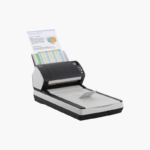
Fujitsu fi-7260 Duplex Document Scanner with Flatbed – 60 ppm, 80-Sheet ADF, USB 3.0
Fujitsu fi-7260 Duplex Document Scanner with Flatbed – 60 ppm, 80-Sheet ADF, USB 3.0 Price on RequestRequest a quote for volume pricing, availability and lead time.
Back to products
Fujitsu fi-7280 Duplex Document Scanner with Flatbed – 80 ppm, 80-Sheet ADF, USB 3.0
Fujitsu fi-7280 Duplex Document Scanner with Flatbed – 80 ppm, 80-Sheet ADF, USB 3.0 Price on RequestRequest a quote for volume pricing, availability and lead time.

Fujitsu fi-7160 Duplex Document Scanner – 60 ppm, 80-Sheet ADF, USB 3.0

SKU: FUJITSU-FI-7160
  • 30-Day Hassle Free Returns
  • Secure Payment Options

Price on RequestRequest a quote for volume pricing, availability and lead time.

Key Value Highlights

  • 60 ppm / 120 ipm scanning – Handles departmental scanning without delays.
  • 80-sheet automatic document feeder – Loads larger batches at once.
  • Paper protection with sound detection – Protects originals from feed damage.
  • PaperStream IP image processing – Produces clean images for OCR.
  • USB 3.0 – Delivers quick transfer to the PC.

Description

The Fujitsu fi-7160 is a duplex desktop document scanner for busy workgroups and departments. It scans up to 60 pages or 120 images per minute at 300 dpi, holds 80 sheets in its feeder, connects through USB 3.0, and includes PaperStream IP and PaperStream Capture for automated image clean-up.

Deep-Dive Story & Problem/Solution

Office Scanners Jam and Slow Down on Real-World Paper

Everyday batches contain creased pages, sticky notes, mixed sizes, and thin receipts. Basic scanners misfeed on these, and staff spend time rescanning or fixing damaged originals.

The fi-7160 monitors feeding sound to stop before paper tears, uses a skew reducer to straighten each sheet, and detects overlapping pages with an ultrasonic sensor.

At 60 ppm, an 80-sheet stack finishes in under two minutes, and PaperStream software removes backgrounds, straightens text, and drops blank pages automatically.

Works With Business Systems

TWAIN and ISIS drivers connect the scanner to document management, ERP, and medical records software.

Long and Thick Media

Embossed cards, card stock, and documents up to 5,588 mm in long page mode are supported.

Setup Instructions

How to Set Up the Fujitsu fi-7160

  1. Connect the power adapter and USB 3.0 cable to the computer.
  2. Install the PaperStream IP driver and PaperStream Capture.
  3. Open the trays, adjust the guides, and load documents face down.
  4. Choose a profile and press Scan.

Overview

ModelFujitsu fi-7160
Scanner TypeADF duplex document scanner
Scan SpeedUp to 60 ppm / 120 ipm (A4, 300 dpi)
Duplex ScanningSingle-pass duplex
Optical Resolution600 dpi
Image SensorColor CCD x 2
ADF Capacity80 sheets
Expected Daily VolumeUp to 9, 000 sheets
Maximum Document Length5, 588 mm (long page mode)
Multi-feed DetectionUltrasonic sensor
InterfaceUSB 3.0
SoftwarePaperStream IP, PaperStream Capture
DriversTWAIN, ISIS
Dimensions300 x 170 x 163 mm
Weight4.2 kg
MaintenanceClean rollers every 5, 000 sheets; replace rollers at 200, 000 sheets

Frequently Asked Questions

Find answers to common questions about this product.

Customer Reviews