HP LaserJet Pro 3001dw Wireless Monochrome Laser Printer – 35 ppm, Auto Duplex, Ethernet and Wi-Fi
HP LaserJet Pro 3001dw Wireless Monochrome Laser Printer – 35 ppm, Auto Duplex, Ethernet and Wi-Fi Price on RequestRequest a quote for volume pricing, availability and lead time.
Back to products
HP Color LaserJet Pro MFP 4301fdw Wireless Color Laser All-in-One – Print, Scan, Copy, Fax, 35 ppm
HP Color LaserJet Pro MFP 4301fdw Wireless Color Laser All-in-One – Print, Scan, Copy, Fax, 35 ppm Price on RequestRequest a quote for volume pricing, availability and lead time.

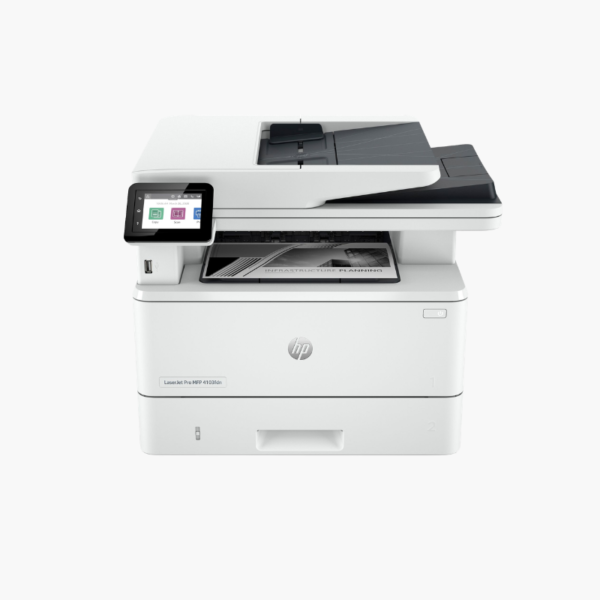
HP LaserJet Pro MFP 4101fdw Wireless Monochrome Laser All-in-One – Print, Scan, Copy, Fax, 42 ppm

SKU: HP-LASERJET-PRO-MFP-4101FDW
  • 30-Day Hassle Free Returns
  • Secure Payment Options

Price on RequestRequest a quote for volume pricing, availability and lead time.

Key Value Highlights

  • 42 ppm with 6.1-second first page – Handles heavy text workloads for teams of up to 10.
  • 50-sheet ADF with single-pass duplex scanning – Scans both sides of each page in one pass.
  • 350-sheet input (100 + 250) – Keeps letterhead or envelopes ready in the multipurpose tray.
  • HP 148X high-yield toner (about 9,500 pages) – Lowers cost per page and replacement frequency.
  • Wi-Fi, Ethernet, and USB – Supports wired and wireless users on the same device.

Description

The HP LaserJet Pro MFP 4101fdw is a monochrome laser all-in-one for small and medium workgroups. It prints at 42 ppm, scans two-sided documents in a single pass through a 50-sheet ADF, and adds copy and fax with wireless and Ethernet networking.

Deep-Dive Story & Problem/Solution

A Shared Office Printer Becomes a Bottleneck When It Is Too Slow

When ten people share one device, speed and capacity decide whether work flows or queues. A 20 ppm machine with a small tray produces a line at the printer, frequent refills, and scans that take minutes for double-sided files.

The 4101fdw runs at 42 ppm with the first page out in about 6.1 seconds. Standard input is 350 sheets across a 250-sheet tray and a 100-sheet multipurpose tray, with a 150-sheet output bin. It is rated for up to 80,000 pages a month.

Its 50-sheet ADF scans both sides of a page in one pass, so digitising contracts and records takes half the time of reversing-feeder designs.

High-Speed Mono Printing at 1200 dpi

Text and fine graphics print cleanly at 1200 x 1200 dpi. Automatic duplex printing is standard, and HP 148A or 148X toner offers yields of roughly 2,900 or 9,500 pages.

Efficient Scanning and Device Management

The 2.7-inch color touchscreen provides scan-to-email, folder, and cloud shortcuts. Apple AirPrint, Mopria, Wi-Fi Direct, and the HP Smart app support mobile users.

Setup Instructions

How to Set Up the HP LaserJet Pro MFP 4101fdw

  1. Unpack the printer, remove packing materials, and check the preinstalled toner cartridge.
  2. Load paper into Tray 2 and connect the power cord and phone line if using fax.
  3. Connect to the network by Ethernet or Wi-Fi using the touchscreen or HP Smart app.
  4. Install drivers, configure scan destinations, and print a test page.

Overview

ModelHP LaserJet Pro MFP 4101fdw
FunctionsPrint, scan, copy, fax
Print TechnologyMonochrome laser
Print SpeedUp to 42 ppm
First Page OutApprox. 6.1 seconds
Print Resolution1200 x 1200 dpi
Monthly Duty CycleUp to 80, 000 pages
Paper Input100-sheet multipurpose tray + 250-sheet tray
Output Capacity150 sheets
Automatic Document Feeder50 sheets, single-pass duplex scanning
Scan Resolution1200 dpi optical (flatbed)
ConnectivityWi-Fi, Ethernet, USB
Control Panel2.7-inch color touchscreen
TonerHP 148A (approx. 2, 900 pages), HP 148X (approx. 9, 500 pages)
Dimensions and Weight16.5 x 15.4 x 12.7 inches; 27.8 lbs
MaintenanceReplace toner when prompted; clean scanner glass and ADF rollers periodically

Frequently Asked Questions

Find answers to common questions about this product.

Customer Reviews

Reviews

There are no reviews yet.

Be the first to review “HP LaserJet Pro MFP 4101fdw Wireless Monochrome Laser All-in-One – Print, Scan, Copy, Fax, 42 ppm”

Your email address will not be published. Required fields are marked *