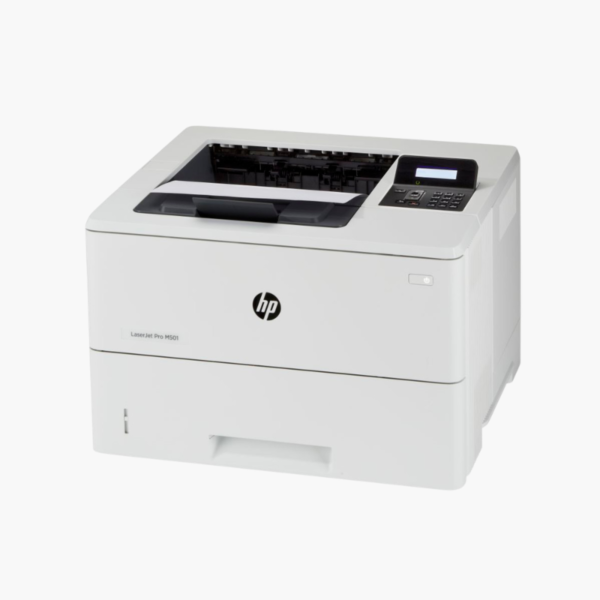
HP LaserJet Pro M501dn Monochrome Laser Printer – 45 ppm, Auto Duplex, 650-Sheet Input, Ethernet

SKU: HP-LASERJET-PRO-M501DN
  • 30-Day Hassle Free Returns
  • Secure Payment Options

Price on RequestRequest a quote for volume pricing, availability and lead time.

Key Value Highlights

  • 45 ppm with 5.7-second first page – Keeps high-volume text printing moving.
  • 650-sheet standard input (550 + 100) – Reduces refills in shared environments.
  • Automatic duplex at up to 36 ipm – Prints two-sided reports without slowing the queue much.
  • 100,000-page monthly duty cycle – Withstands heavy departmental workloads.
  • Ethernet and USB with mobile printing – Fits managed networks and supports AirPrint and Mopria.

Description

The HP LaserJet Pro M501dn is a monochrome laser printer for workgroups that print thousands of pages a month. It runs at 45 ppm, holds 650 sheets as standard, duplexes automatically, and connects by Ethernet or USB for reliable, managed office use.

Deep-Dive Story & Problem/Solution

High-Volume Printing Wears Out Light-Duty Printers

Departments that print pick lists, patient forms, legal documents, or statements all day put loads on a printer that entry-level models are not built for. Rollers wear, trays empty every hour, and the device spends more time being attended to than printing.

The M501dn is rated for a monthly duty cycle of up to 100,000 pages, with a recommended range of 1,500 to 6,000 pages. Its 550-sheet main tray and 100-sheet multipurpose tray hold more than a ream combined.

The engine prints at 45 ppm with the first page out in about 5.7 seconds. HP 87A and high-yield 87X toner cartridges keep per-page costs and interventions low.

Departmental Speed and Capacity

A 250-sheet output bin collects long jobs. Automatic duplex printing is standard, and HP FastRes technology provides fine text and graphics from a 600 dpi engine.

Managed and Mobile-Ready

Gigabit-capable Ethernet and USB connect the printer, while Apple AirPrint, HP ePrint, and Mopria support mobile devices. A two-line LCD with keypad allows PIN-protected printing.

Setup Instructions

How to Set Up the HP LaserJet Pro M501dn

  1. Unpack the printer, remove tape, and pull the sealing strip from the toner cartridge.
  2. Load paper into the 550-sheet tray and adjust the guides.
  3. Connect power and an Ethernet cable, then set the IP configuration on the control panel if needed.
  4. Install the driver on client computers and print a configuration page.

Overview

ModelHP LaserJet Pro M501dn
FunctionsPrint
Print TechnologyMonochrome laser
Print SpeedUp to 45 ppm
First Page OutApprox. 5.7 seconds
Print Resolution600 x 600 dpi; up to 4800 x 600 enhanced
Monthly Duty CycleUp to 100, 000 pages
Paper Input550-sheet tray + 100-sheet multipurpose tray
Output Capacity250 sheets
Duplex PrintingAutomatic, up to 36 ipm
ConnectivityEthernet, USB 2.0
Control PanelTwo-line backlit LCD with numeric keypad
TonerHP 87A / 87X
Dimensions and Weight16.5 x 11.4 x 14.8 inches (W x D x H); 25.6 lbs
MaintenanceReplace toner when prompted

Frequently Asked Questions

Find answers to common questions about this product.

Customer Reviews

Reviews

There are no reviews yet.

Be the first to review “HP LaserJet Pro M501dn Monochrome Laser Printer – 45 ppm, Auto Duplex, 650-Sheet Input, Ethernet”

Your email address will not be published. Required fields are marked *