HP Color LaserJet Pro MFP 4301fdn Color Laser All-in-One – Print, Scan, Copy, Fax, 35 ppm, Ethernet
HP Color LaserJet Pro MFP 4301fdn Color Laser All-in-One – Print, Scan, Copy, Fax, 35 ppm, Ethernet Price on RequestRequest a quote for volume pricing, availability and lead time.
Back to products
HP LaserJet MFP M234sdw Wireless Monochrome Laser All-in-One – Print, Scan, Copy, 40-Sheet ADF, 30 ppm
HP LaserJet MFP M234sdw Wireless Monochrome Laser All-in-One – Print, Scan, Copy, 40-Sheet ADF, 30 ppm Price on RequestRequest a quote for volume pricing, availability and lead time.

HP LaserJet Pro MFP 3101sdw Wireless Monochrome Laser All-in-One – Print, Scan, Copy, 2-Sided Scanning, 35 ppm

SKU: HP-LASERJET-PRO-MFP-3101SDW
  • 30-Day Hassle Free Returns
  • Secure Payment Options

Price on RequestRequest a quote for volume pricing, availability and lead time.

Key Value Highlights

  • 35 ppm with 6.6-second first page – Keeps small teams productive.
  • 50-sheet ADF with two-sided scanning – Captures both sides of each page automatically.
  • Automatic duplex printing – Reduces paper use.
  • Wi-Fi, Ethernet, USB, and Bluetooth LE – Supports wired and wireless setups.
  • 2.7-inch color touchscreen – Offers one-tap scan and copy shortcuts.

Description

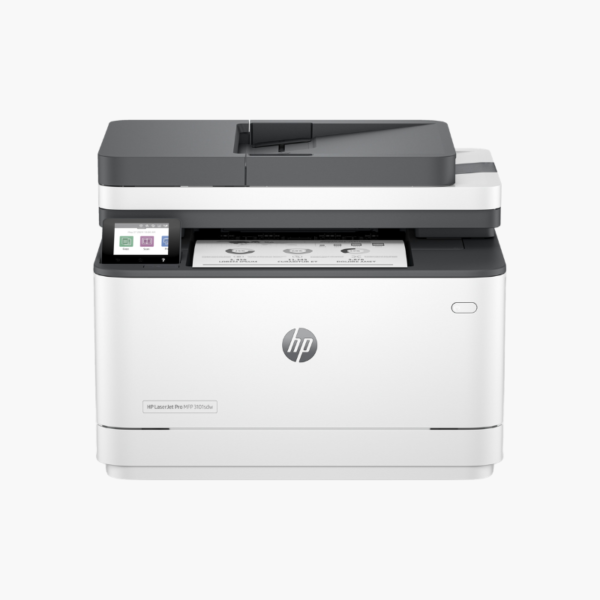
The HP LaserJet Pro MFP 3101sdw is a wireless monochrome laser all-in-one for small offices that scan as much as they print. It prints at 35 ppm, and its 50-sheet ADF scans both sides of a document automatically for fast digitising.

Deep-Dive Story & Problem/Solution

Two-Sided Paperwork Doubles the Effort on a Simplex Scanner

Leases, medical forms, and bank statements are printed on both sides. On an all-in-one with a one-sided feeder, staff scan the stack, flip it, scan again, and then reorder the pages in software.

The 3101sdw has a 50-sheet ADF that scans both sides automatically at about 20 pages per minute. Stack the originals, press scan, and the file arrives complete and in order.

Printing is equally efficient: 35 ppm, a first page in about 6.6 seconds, 1200 x 1200 dpi, and automatic duplex.

Duplex Scanning for Faster Digitising

Send scans to email, folders, or cloud services from the 2.7-inch touchscreen or the HP app.

Small-Office Paper Handling

A 250-sheet tray and 150-sheet output bin support recommended volumes of 350 to 2,500 pages a month. HP 138A and 138X toner are compatible.

Setup Instructions

How to Set Up the HP LaserJet Pro MFP 3101sdw

  1. Remove packaging and load paper in the 250-sheet tray.
  2. Connect power and follow the touchscreen language and region prompts.
  3. Join Wi-Fi through the HP app or connect an Ethernet cable.
  4. Install software and run a two-sided test scan from the ADF.

Overview

ModelHP LaserJet Pro MFP 3101sdw
FunctionsPrint, scan, copy
Print TechnologyMonochrome laser
Print SpeedUp to 35 ppm
First Page OutApprox. 6.6 seconds
Print ResolutionUp to 1200 x 1200 dpi
Monthly Duty CycleUp to 50, 000 pages
Paper Input250-sheet tray
Output Capacity150 sheets
Automatic Document Feeder50 sheets with 2-sided scanning
Duplex PrintingAutomatic
ConnectivityWi-Fi, Ethernet, USB 2.0, Bluetooth LE
Control Panel2.7-inch color touchscreen
TonerHP 138A / 138X
Dimensions and Weight41.8 x 39.8 x 31.3 cm; 10.5 kg

Frequently Asked Questions

Find answers to common questions about this product.

Customer Reviews

Reviews

There are no reviews yet.

Be the first to review “HP LaserJet Pro MFP 3101sdw Wireless Monochrome Laser All-in-One – Print, Scan, Copy, 2-Sided Scanning, 35 ppm”

Your email address will not be published. Required fields are marked *