Dell Premier KB900 Wireless Collaboration Keyboard (KB900-GR)
Dell Premier KB900 Wireless Collaboration Keyboard (KB900-GR) – Wireless, Numeric Keypad Price on RequestRequest a quote for volume pricing, availability and lead time.
Back to products
HP 125 Wired Keyboard G2 (AY2Y7AA)
HP 125 Wired Keyboard G2 (AY2Y7AA) – Wired, Numeric Keypad Price on RequestRequest a quote for volume pricing, availability and lead time.

Dell Latitude 7350 Detachable Collaboration Keyboard (K21MBRUS)

SKU: K21MBRUS
  • 30-Day Hassle Free Returns
  • Secure Payment Options

Price on RequestRequest a quote for volume pricing, availability and lead time.

Key Value Highlights

  • Detachable pogo connection – Snaps onto the tablet and draws power from it.
  • Compact laptop layout – Compact layout that travels with the device.
  • Collaboration keys – One-touch mute, camera and call controls for Teams and Zoom.
  • Backlit keys – Type clearly in dim rooms and on late nights.
  • Integrated touchpad – Integrated touchpad for laptop-style control.

Description

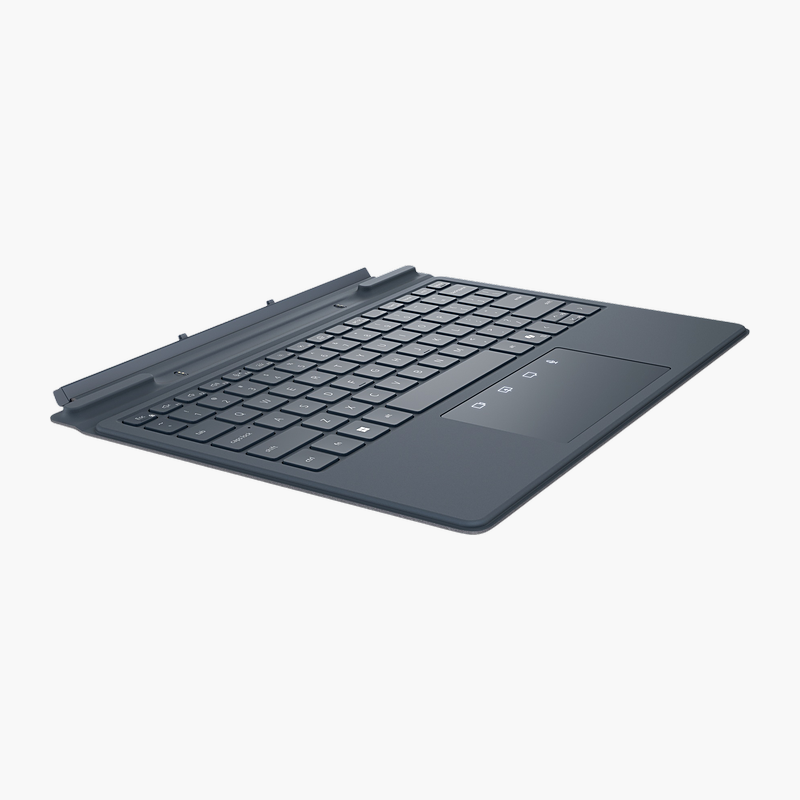
The Dell Latitude 7350 Detachable Collaboration Keyboard is a detachable keyboard with a compact laptop layout, plus collaboration keys and backlit keys. It is built for hybrid workers who spend the day on video calls, delivering comfortable, accurate typing wherever you take the tablet. It works with Windows (Dell Latitude 7350 Detachable).

Comfortable typing for every workday.

Control Your Calls Without Leaving the Keyboard

Worn or cramped keyboards cause typing errors and fatigue, and switching between separate devices for calls, sign-in or data entry slows the working day.

The Dell Latitude 7350 Detachable Collaboration Keyboard offers a compact laptop layout, plus collaboration keys and backlit keys, and connects via detachable pogo connection.

Layout and Features

The compact laptop layout gives every key a familiar position. One-touch mute, camera and call controls for Teams and Zoom. Type clearly in dim rooms and on late nights.

Connection and Power

Connects via detachable pogo connection. It draws power from the tablet and is compatible with Windows (Dell Latitude 7350 Detachable).

Setup Instructions

How to Set Up the Dell Latitude 7350 Detachable Collaboration Keyboard

  1. Align the keyboard with the magnetic connector on the bottom edge of the Dell Latitude 7350 Detachable.
  2. Let the magnets snap it into place – no pairing is required.
  3. Fold the keyboard to the typing position and start working.
  4. Adjust backlight and keyboard settings in Windows.

Overview

BrandDell
ModelLatitude 7350 Detachable Collaboration Keyboard
Product TypeKeyboard
Interface TypeDetachable
ConnectionDetachable pogo connection
LayoutCompact laptop layout (US English)
Numeric KeypadNo
Key FeaturesCollaboration keys; Backlit keys; Integrated touchpad
Power SourcePowered by the tablet
OS CompatibilityWindows (Dell Latitude 7350 Detachable)
Multi-DeviceNo
Smart Card ReaderNo
Part NumberK21MBRUS
ConditionBrand New
In the BoxKeyboard, quick start guide

Frequently Asked Questions

Find answers to common questions about this product.

Customer Reviews

Reviews

There are no reviews yet.

Be the first to review “Dell Latitude 7350 Detachable Collaboration Keyboard (K21MBRUS)”

Your email address will not be published. Required fields are marked *