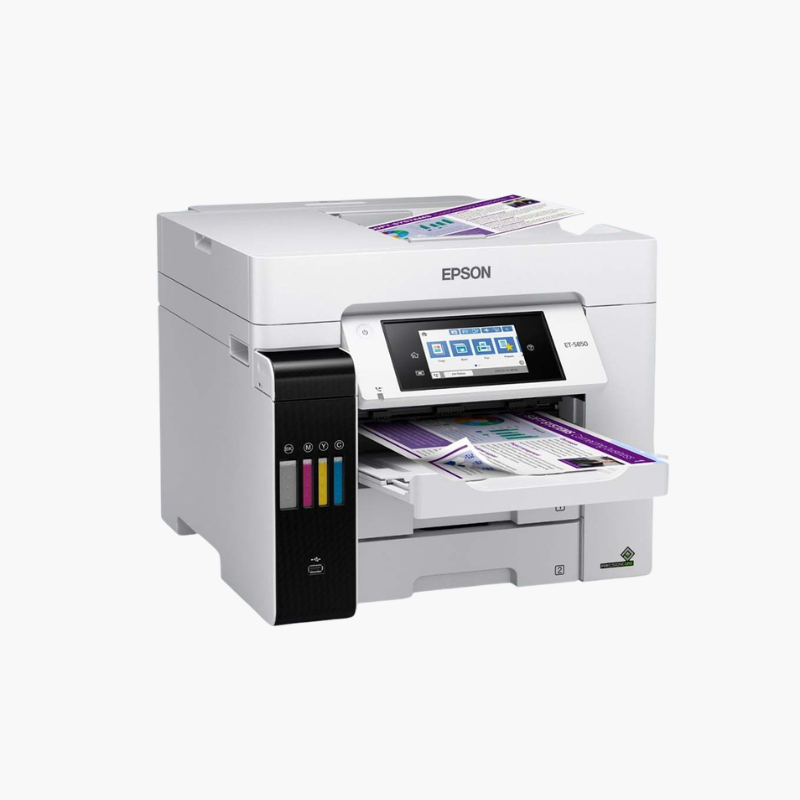
Epson EcoTank Pro ET-5850 Wireless Color All-in-One Supertank Printer – Fax, Ethernet, 550-Sheet Capacity, 25 ppm

SKU: EPSON-ECOTANK-PRO-ET-5850
  • 30-Day Hassle Free Returns
  • Secure Payment Options

Price on RequestRequest a quote for volume pricing, availability and lead time.

Key Value Highlights

  • 25 ISO ppm black and color – Matches workgroup laser speed.
  • 500-sheet front trays plus 50-sheet rear feed – Keep large jobs running without refills.
  • 50-sheet ADF with auto 2-sided scan, copy, and fax – Processes double-sided documents automatically.
  • Cartridge-free pigment ink – Each black bottle yields about 7,500 pages and each color set about 6,000.
  • 66,000-page maximum monthly duty cycle – Supports demanding small-business workloads.

Description

The Epson EcoTank Pro ET-5850 is a wireless color all-in-one supertank printer for busy small businesses and workgroups. It prints at 25 ISO ppm in black and color, holds 550 sheets, and offers automatic two-sided print, copy, scan, and fax.

Deep-Dive Story & Problem/Solution

Busy Offices Choose Lasers for Speed, Then Pay for Toner and Power

Color laser all-in-ones have been the default for teams that print thousands of pages a month. They deliver speed, but toner sets are expensive and fusers draw significant power.

The ET-5850 achieves 25 ISO ppm in both black and color using PrecisionCore Heat-Free inkjet technology. With no fuser to heat, the first page arrives quickly and energy use is lower.

Epson 542 DURABrite pigment ink comes in bottles. The box includes two black bottles rated for about 7,500 pages each and two color sets rated for about 6,000 pages each.

Laser-Class Speed, Supertank Cost

Print resolution reaches 4800 x 2400 dpi. Two 250-sheet trays and a 50-sheet rear feed supply 550 sheets, with a recommended volume of 200 to 3,300 pages a month.

Complete Duplex Workflow

The 50-sheet ADF handles originals up to 8.5 x 14 inches with automatic two-sided scanning, copying, and faxing. A 4.3-inch touchscreen, Wi-Fi 5, Ethernet, and Bluetooth LE setup are included.

Setup Instructions

How to Set Up the Epson EcoTank Pro ET-5850

  1. With two people, position the 39.2 lb printer and remove packing materials.
  2. Fill the four ink tanks from the 542 bottles and start ink charging.
  3. Load paper in both front trays.
  4. Connect to the network, attach the fax line, and print a nozzle check.

Overview

ModelEpson EcoTank Pro ET-5850
FunctionsPrint, copy, scan, fax
Print TechnologyPrecisionCore Heat-Free inkjet, cartridge-free supertank
Print Speed25 ISO ppm black and color
Print ResolutionUp to 4800 x 2400 dpi
InkEpson 542 DURABrite pigment (black 127 mL; colors 70 mL)
Ink YieldApprox. 7, 500 pages per black bottle; 6, 000 pages per color set
Paper Input2 x 250-sheet trays + 50-sheet rear feed
Automatic Document Feeder50 sheets, up to 8.5 x 14 inches
DuplexAutomatic print, copy, scan, and fax
Monthly Duty CycleUp to 66, 000 pages (recommended 200 to 3, 300)
ConnectivityWi-Fi 5, Wi-Fi Direct, Ethernet, USB
Control Panel4.3-inch color touchscreen
Dimensions16.7 x 19.7 x 13.8 inches (storage)
Weight39.2 lbs
MaintenanceRefill tanks from bottles; replace maintenance box when prompted

Frequently Asked Questions

Find answers to common questions about this product.

Customer Reviews

Reviews

There are no reviews yet.

Be the first to review “Epson EcoTank Pro ET-5850 Wireless Color All-in-One Supertank Printer – Fax, Ethernet, 550-Sheet Capacity, 25 ppm”

Your email address will not be published. Required fields are marked *