Epson WorkForce ES-400 II Duplex Desktop Document Scanner – 35 ppm, 50-Sheet ADF, USB
Epson WorkForce ES-400 II Duplex Desktop Document Scanner – 35 ppm, 50-Sheet ADF, USB Price on RequestRequest a quote for volume pricing, availability and lead time.
Back to products
Epson WorkForce ES-50 Portable Sheet-Fed Document Scanner – USB Powered, 600 dpi
Epson WorkForce ES-50 Portable Sheet-Fed Document Scanner – USB Powered, 600 dpi Price on RequestRequest a quote for volume pricing, availability and lead time.

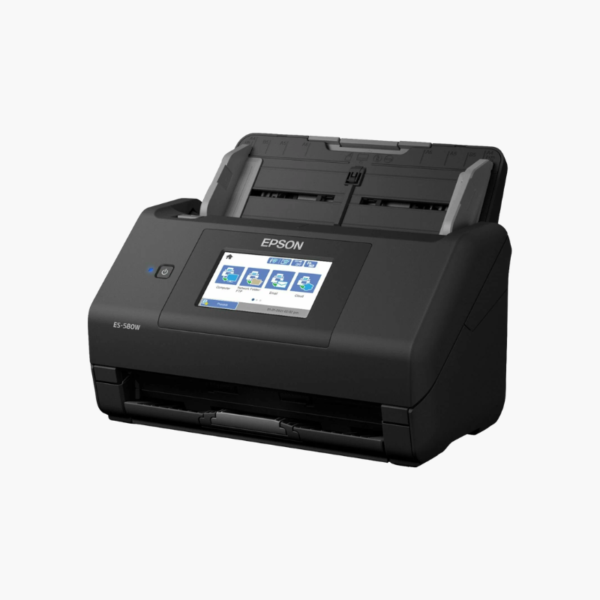
Epson WorkForce ES-580W Wireless Duplex Desktop Document Scanner – 35 ppm, 100-Sheet ADF, 4.3-Inch Touchscreen

SKU: EPSON-WORKFORCE-ES-580W
  • 30-Day Hassle Free Returns
  • Secure Payment Options

Price on RequestRequest a quote for volume pricing, availability and lead time.

Key Value Highlights

  • 35 ppm / 70 ipm scanning – Captures two-sided pages in a single pass.
  • 100-sheet auto document feeder – Runs larger batches without reloading.
  • 4.3-inch touchscreen – Starts scans to cloud, email, or USB drive without a computer.
  • Wi-Fi and USB 3.0 – Serves several users or connects directly to one PC.

Description

The Epson WorkForce ES-580W is a wireless color duplex desktop document scanner for small offices and shared workspaces. It scans up to 35 pages or 70 images per minute from a 100-sheet feeder, and its 4.3-inch touchscreen sends scans to cloud services, email, or a USB drive without a computer.

Deep-Dive Story & Problem/Solution

A Scanner Tied to One Computer Limits the Whole Team

When a scanner connects to a single PC, everyone else has to borrow that desk or email requests. Scanning becomes a bottleneck and documents wait to be processed.

The ES-580W connects over Wi-Fi, so several users can scan to their own computers, phones, or tablets. From the touchscreen, jobs go straight to a USB memory drive or online storage accounts.

The 100-sheet feeder halves the reloading compared with 50-sheet models, and Epson ScanSmart software organizes files with searchable text.

PC-Free Scanning

Saved touchscreen presets send documents to frequent destinations with one tap, which is useful at reception desks and shared areas.

Clean Results Automatically

Auto crop, deskew, blank page skip, and background removal improve legibility. The scanner is rated for a peak of 4,000 sheets per day.

Setup Instructions

How to Set Up the Epson ES-580W

  1. Connect power and switch on the scanner.
  2. Use the touchscreen wizard to join the Wi-Fi network, or connect by USB 3.0.
  3. Install Epson ScanSmart on computers and the Epson Smart Panel app on phones.
  4. Load documents face down and select a destination on the touchscreen.

Overview

ModelEpson WorkForce ES-580W
Scanner TypeWireless sheet-fed duplex document scanner
Scan SpeedUp to 35 ppm / 70 ipm
Duplex ScanningSingle-pass duplex
Optical Resolution600 dpi
ADF Capacity100 sheets
Display4.3-inch color touchscreen
ConnectivityWi-Fi, USB 3.0
PC-Free ScanningTo USB drive, email, cloud services
Peak Daily Duty Cycle4, 000 sheets
SoftwareEpson ScanSmart, Epson Smart Panel app
DriversTWAIN
Operating SystemsWindows, macOS, iOS, Android
MaintenanceClean rollers and glass; replace roller kit when due

Frequently Asked Questions

Find answers to common questions about this product.

Customer Reviews

Reviews

There are no reviews yet.

Be the first to review “Epson WorkForce ES-580W Wireless Duplex Desktop Document Scanner – 35 ppm, 100-Sheet ADF, 4.3-Inch Touchscreen”

Your email address will not be published. Required fields are marked *