HP ScanJet Pro 2600 f1 Flatbed Document Scanner – 25 ppm, Duplex, 60-Sheet ADF, 20G05A
HP ScanJet Pro 2600 f1 Flatbed Document Scanner – 25 ppm, Duplex, 60-Sheet ADF, 20G05A Price on RequestRequest a quote for volume pricing, availability and lead time.
Back to products
Epson WorkForce ES-580W Wireless Duplex Desktop Document Scanner – 35 ppm, 100-Sheet ADF, 4.3-Inch Touchscreen
Epson WorkForce ES-580W Wireless Duplex Desktop Document Scanner – 35 ppm, 100-Sheet ADF, 4.3-Inch Touchscreen Price on RequestRequest a quote for volume pricing, availability and lead time.

Epson WorkForce ES-400 II Duplex Desktop Document Scanner – 35 ppm, 50-Sheet ADF, USB

SKU: EPSON-WORKFORCE-ES-400-II
  • 30-Day Hassle Free Returns
  • Secure Payment Options

Price on RequestRequest a quote for volume pricing, availability and lead time.

Key Value Highlights

  • 35 ppm / 70 ipm scanning – Processes two-sided documents in one pass.
  • 50-sheet auto document feeder – Scans stacks without manual feeding.
  • Epson ScanSmart software – Previews, names, and sends files in a few clicks.
  • TWAIN driver included – Works with most document management software.

Description

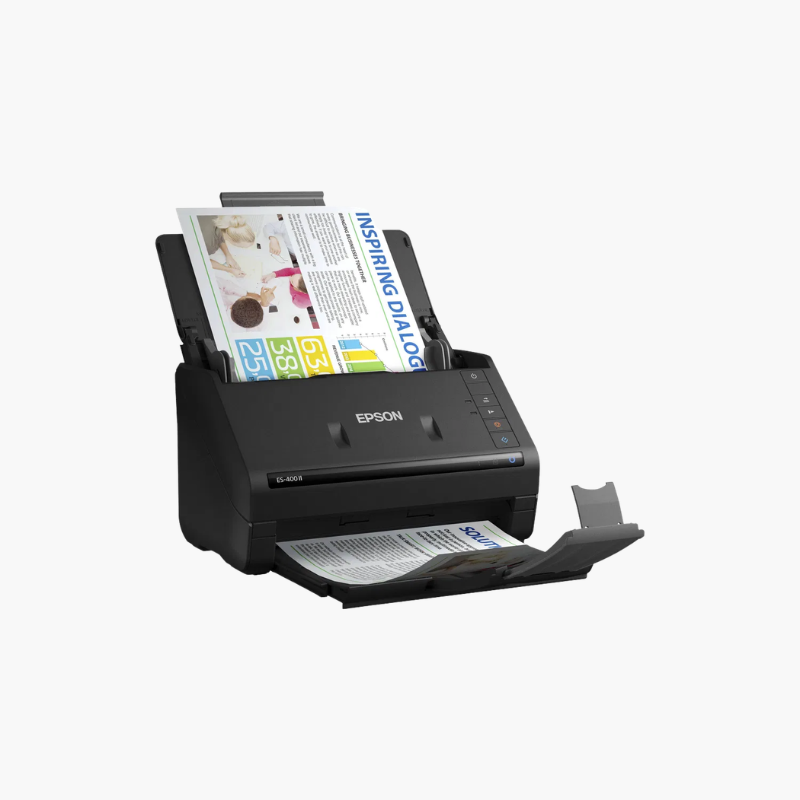
The Epson WorkForce ES-400 II is a color duplex desktop document scanner for home offices and small businesses. It scans up to 35 pages or 70 images per minute, holds 50 sheets in its auto document feeder, and includes Epson ScanSmart software and a TWAIN driver for use with common applications.

Deep-Dive Story & Problem/Solution

Loose Paperwork Piles Up Faster Than It Gets Filed

Bills, tax records, client forms, and receipts gather on desks because scanning them one at a time is tedious. Important documents become difficult to locate when they are needed.

The ES-400 II scans both sides of a 50-sheet stack in one run. ScanSmart software previews the scan, suggests file names, and saves searchable PDFs or sends files to email and cloud services.

Automatic cropping, blank page and background removal, and deskew produce clean files with no manual editing.

Handles Varied Originals

Business cards, ID cards, receipts, and long pages feed through the same path, with a rated peak of 4,000 sheets per day.

Small Desktop Footprint

At about 11.6 x 6.6 x 6.9 inches and 8.1 lbs, the scanner fits next to a monitor and folds closed when not in use.

Setup Instructions

How to Set Up the Epson ES-400 II

  1. Connect the power adapter and USB cable to the scanner and computer.
  2. Download and install Epson ScanSmart and the scanner driver.
  3. Open the input tray, set the edge guides, and load documents face down.
  4. Press the scan button and review the result in ScanSmart.

Overview

ModelEpson WorkForce ES-400 II
Scanner TypeSheet-fed duplex document scanner
Scan SpeedUp to 35 ppm / 70 ipm
Duplex ScanningSingle-pass duplex
Optical Resolution600 dpi
ADF Capacity50 sheets
Peak Daily Duty Cycle4, 000 sheets
InterfaceUSB
SoftwareEpson ScanSmart
DriversTWAIN
Operating SystemsWindows, macOS
Dimensions11.6 x 6.6 x 6.9 inches
Weight8.1 lbs
MaintenanceClean rollers and glass; replace roller kit when due

Frequently Asked Questions

Find answers to common questions about this product.

Customer Reviews

Reviews

There are no reviews yet.

Be the first to review “Epson WorkForce ES-400 II Duplex Desktop Document Scanner – 35 ppm, 50-Sheet ADF, USB”

Your email address will not be published. Required fields are marked *