Canon Color imageCLASS MF653Cdw Wireless Color Laser Multifunction Printer – Print, Copy, Scan, Auto Duplex
Canon Color imageCLASS MF653Cdw Wireless Color Laser Multifunction Printer – Print, Copy, Scan, Auto Duplex Price on RequestRequest a quote for volume pricing, availability and lead time.
Back to products
HP ScanJet Pro 2000 s2 Sheet-Feed Document Scanner – 35 ppm, Duplex, 50-Sheet ADF, USB 3.0
HP ScanJet Pro 2000 s2 Sheet-Feed Document Scanner – 35 ppm, Duplex, 50-Sheet ADF, USB 3.0 Price on RequestRequest a quote for volume pricing, availability and lead time.

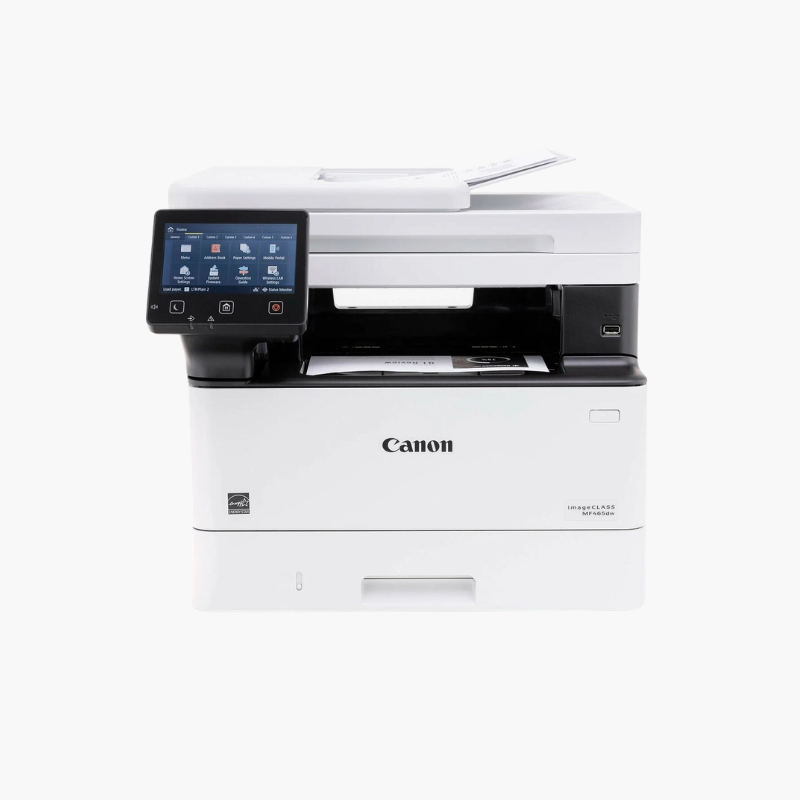
Canon imageCLASS MF465dw Wireless Monochrome Laser All-in-One Printer – 42 ppm, Print, Scan, Copy, Fax

SKU: CANON-IMAGECLASS-MF465DW
  • 30-Day Hassle Free Returns
  • Secure Payment Options

Price on RequestRequest a quote for volume pricing, availability and lead time.

Key Value Highlights

  • 42 ppm monochrome printing – Moves through invoices and reports quickly.
  • Print, scan, copy, and fax – Handles all routine document tasks in one unit.
  • 50-sheet single-pass duplex ADF – Scans two-sided pages in one pass.
  • 350-sheet standard capacity – Expands with an optional 550-sheet cassette.
  • Wi-Fi, Ethernet, and USB – Connects to small office networks.

Description

The Canon imageCLASS MF465dw is a wireless monochrome laser all-in-one for small and medium offices. It prints at up to 42 pages per minute, scans, copies, and faxes, and includes a 50-sheet single-pass duplex document feeder, a 5-inch color touchscreen, and 350 sheets of standard paper capacity.

Deep-Dive Story & Problem/Solution

Document-Heavy Offices Need Speed Without a Large Copier

Law firms, clinics, and accounting practices print and scan large volumes of black-and-white pages. A floor-standing copier is costly, while entry-level printers slow down under that workload.

The MF465dw prints 42 pages per minute at up to 1200 x 1200 dpi from a desktop footprint. Its single-pass duplex feeder scans two-sided documents quickly for archiving or email.

Canon 070 toner is available in standard and high-capacity versions, so busy offices can extend the time between replacements.

Paper Handling

A 250-sheet cassette and 100-sheet multipurpose tray are standard. An optional 550-sheet cassette raises total capacity to 900 sheets.

Touchscreen Workflows

The 5-inch color touchscreen stores common scan and copy jobs. AirPrint, Mopria, and the Canon PRINT app handle mobile printing.

Setup Instructions

How to Set Up the Canon MF465dw

  1. Remove packing materials and install the toner cartridge.
  2. Load paper in the cassette and power on the printer.
  3. Complete the touchscreen setup and connect to Wi-Fi or Ethernet.
  4. Install drivers on each computer and connect the phone line for fax.

Overview

ModelCanon imageCLASS MF465dw
Printer TypeMonochrome laser all-in-one
FunctionsPrint, scan, copy, fax
Print SpeedUp to 42 ppm (letter)
Print ResolutionUp to 1200 x 1200 dpi
Duplex PrintingAutomatic
Document Feeder50-sheet single-pass duplex ADF
Scan SpeedUp to 40 ipm simplex / 80 ipm duplex
Standard Paper Capacity250-sheet cassette + 100-sheet multipurpose tray
Optional Paper Capacity550-sheet cassette
Display5-inch color touchscreen
ConnectivityWi-Fi, Ethernet, USB
TonerCanon 070 / 070 High Capacity
Mobile PrintingApple AirPrint, Mopria, Canon PRINT app
MaintenanceReplace toner as prompted; clean ADF rollers

Frequently Asked Questions

Find answers to common questions about this product.

Customer Reviews

Reviews

There are no reviews yet.

Be the first to review “Canon imageCLASS MF465dw Wireless Monochrome Laser All-in-One Printer – 42 ppm, Print, Scan, Copy, Fax”

Your email address will not be published. Required fields are marked *