
Networking
Shop all 595 products

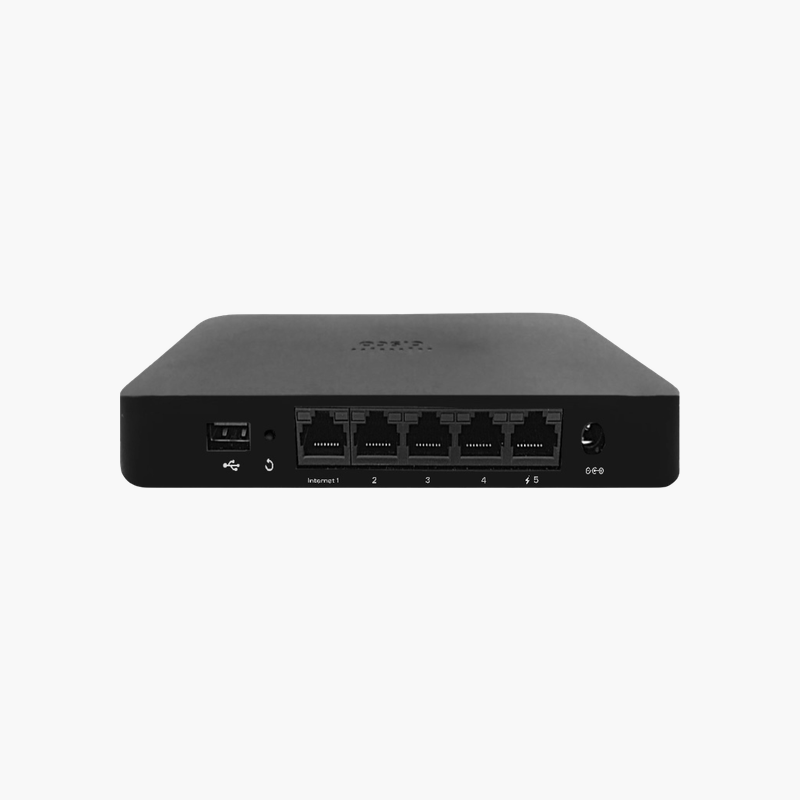
Bring the office network to every home worker, with LTE backup.
The Cisco Meraki Z3C is a cloud-managed teleworker gateway with a built-in LTE uplink, 802.11ac Wave 2 Wi-Fi and five Gigabit ports including one PoE port. It extends corporate network, security policies and VPN to remote employees and small home offices.
Why Home Broadband Is Not Enough for Remote Employees
Remote employees connect to company systems over consumer routers that IT cannot see or manage. VPN clients drop, home Wi-Fi is shared with family devices, and an internet outage stops work completely.
The Z3C creates a managed extension of the corporate network at home. Meraki Auto VPN connects it securely to headquarters, a corporate SSID broadcasts the same Wi-Fi as the office, and policies are applied centrally from the Meraki dashboard.
If the home internet fails, the built-in LTE modem takes over as a failover uplink using a nano SIM, so calls and applications keep working.
Zero-Touch Cloud Management
IT pre-configures the Z3C in the Meraki dashboard and ships it to the employee. When it is plugged in, it downloads its configuration automatically, and IT can monitor and troubleshoot it remotely.
PoE for Desk Phones
One LAN port supplies PoE, so an IP desk phone can be powered directly by the gateway, keeping home office setups tidy.
How to Set Up the Cisco Meraki Z3C
- Claim the Z3C in your Meraki dashboard, assign it to a network and configure SSIDs, VPN and firewall rules.
- Insert a nano SIM for LTE failover if required.
- At the remote site, connect the WAN port to the home router or modem and power on the gateway.
- Connect the desk phone to the PoE port and devices to the other LAN ports, then confirm status in the dashboard.














Reviews
There are no reviews yet.