
Networking
Shop all 595 products
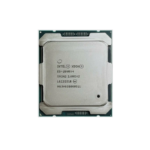

The Intel Xeon E-2276G is an Intel Xeon E-2200 processor built on Coffee Lake Refresh (14nm), with 6 cores, 12 threads, a 3.8 GHz base clock and up to 4.9 GHz turbo. It uses the LGA1151 (300-series) socket, supports DDR4-2666 ECC memory (2 channels (up to 128GB)) and is designed for small business servers, NAS builds and entry workstations.
Why Small-Business Servers Need ECC Memory and Xeon Reliability – Intel Xeon E-2276G
Small offices, NAS builds and homelabs often start on desktop hardware, then run into the same problems: no ECC memory support, the risk of silent data corruption and platforms that are not validated for 24/7 operation.
The Xeon E-2276G is a single-socket Xeon built for that job. Its 6 cores and 12 threads at up to 4.9 GHz handle file serving, backup, small databases, virtualization and services such as Active Directory, while DDR4-2666 ECC support protects data in memory.
Its integrated Intel UHD Graphics P630 adds local display output and Intel Quick Sync, which is useful for media servers that transcode video. It requires a motherboard with the Intel C246 chipset; consumer chipsets do not support Xeon E-series processors.
6 Cores With Turbo Boost up to 4.9 GHz
The Xeon E-2276G balances core count and clock speed. Turbo Boost raises individual cores up to 4.9 GHz when workloads need responsiveness, while all 6 cores work together on parallel tasks such as virtualization, backups and compiling.
ECC Memory and Workstation-Grade Graphics
ECC memory support protects against single-bit memory errors, and the integrated Intel UHD Graphics P630 uses certified drivers for professional applications and Quick Sync for media transcoding.
Setup Instructions
How to Install the Intel Xeon E-2276G
- Confirm your system board uses the LGA1151 (300-series) socket with the Intel C246 only chipset, and update the BIOS to a version that lists the Xeon E-2276G as supported.
- Lift the socket load plate, align the notches on the Xeon E-2276G with the socket keys and lower it straight down. Close the load plate and lever; the socket cover will pop off.
- Apply a thin layer of thermal paste and mount an LGA1151-compatible cooler rated for at least 80W.
- Install ECC memory following the board’s channel population guide, power on, confirm the processor and memory are detected in the BIOS or BMC, then install your operating system or hypervisor.






Reviews
There are no reviews yet.