
Networking
Shop all 595 products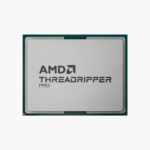

The AMD Ryzen Threadripper PRO 9985WX (100-100000722WOF) is an sTR5 workstation processor with 64 cores, 128 threads and boost clocks up to 5.4GHz. Built on Zen 5, with 256MB L3, it is aimed at 3D artists, engineers, video editors and AI developers running heavy multi-threaded workloads.
Workstation core counts for renders, simulations and AI.
Why Pro Workloads Outgrow Desktop Processors
Rendering, simulation, large code builds and local AI work scale with cores, memory bandwidth and PCIe lanes. Mainstream desktop platforms top out at dual-channel memory and limited lanes, which caps how many GPUs, NVMe drives and network cards you can run at full speed.
The AMD Ryzen Threadripper PRO 9985WX moves to the sTR5 workstation platform: 64 cores, DDR5-6400 ECC RDIMM, 8-channel memory and 128 PCIe 5.0 lanes. Multi-GPU rigs, large memory footprints and fast storage arrays run without the bottlenecks of a desktop platform.
Cores, Clocks and Cache in Practice
With 64 cores, 128 threads, up to 5.4GHz and 256MB L3, the AMD Ryzen Threadripper PRO 9985WX handles renders, simulations and multi-GPU compute with headroom. Power is rated at 350W TDP.
Platform and Connectivity
The sTR5 socket supports DDR5-6400 ECC RDIMM, 8-channel and 128 PCIe 5.0 lanes. A discrete graphics card is required for display output. The unlocked multiplier allows overclocking on supported motherboards.
Setup Instructions
How to Install the AMD Ryzen Threadripper PRO 9985WX
- Check your motherboard uses the sTR5 socket and update its BIOS to a version that supports the Ryzen Threadripper PRO 9985WX.
- Open the socket retention mechanism, align the CPU’s markings with the socket and lower it in without force.
- Apply thermal paste if needed and install a capable air or liquid cooler – no cooler is included.
- Install a discrete graphics card, boot into BIOS, confirm memory runs in all channels and install the latest chipset drivers.






Reviews
There are no reviews yet.