
Networking
Shop all 595 products

Business-grade Cisco switching for 8 devices.
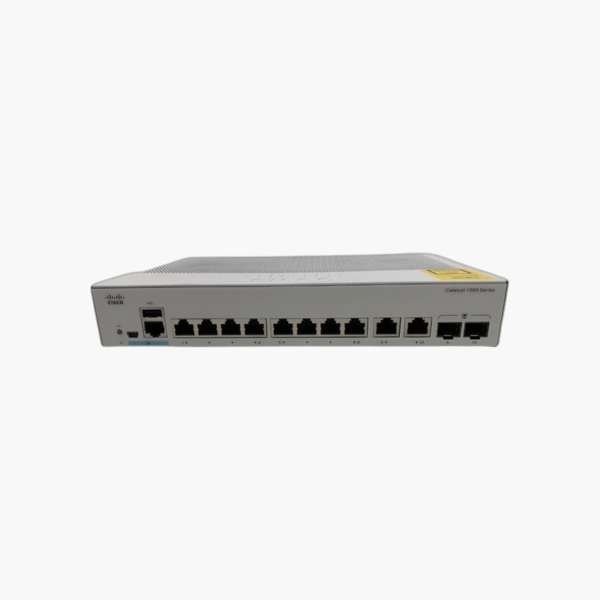
The Cisco C1000-8T-E-2G-L is an 8-port Gigabit Ethernet switch from the Catalyst 1000 Series, with two combo uplinks that accept either an SFP fiber module or a copper cable. It is built for small offices, retail counters, conference rooms and branch sites that need Cisco-grade Layer 2 management, security and reliability without enterprise licensing costs.
Why Unmanaged and Consumer Switches Fall Short in a Business Network
An unmanaged switch connects devices, but it gives you no control over who connects, how traffic is prioritized, or what happens when a cable loop takes the network down. As an office grows, those gaps turn into broadcast storms, open ports anyone can plug into, and no visibility when users report slow connections.
The C1000-8T-E-2G-L adds the controls a business network needs: up to 256 active VLANs to separate staff, guest and device traffic; IEEE 802.1X and port security to block unauthorized devices; Spanning Tree to stop loops; and QoS so voice and video traffic are handled first. It does this on Cisco IOS-based software, so configuration is familiar to any network technician.
Performance stays predictable because the switching fabric is non-blocking: 20 Gbps of capacity and a 14.88 Mpps forwarding rate cover every port at line rate, plus the uplinks.
Gigabit Uplinks for Fiber or Copper Links
The 2 x Gigabit SFP/RJ-45 combo ports let you connect this switch to a core switch or another closet over fiber, which supports longer distances than copper and is immune to electrical interference. Because they are combo ports, you can use a standard copper cable today and add SFP fiber modules later.
Silent, Fanless Design with External Power Supply
With no internal fan, the C1000-8T-E-2G-L runs silently and has fewer moving parts to wear out, which suits desks, classrooms, shops and meeting rooms. The power supply is an external adapter, which keeps heat out of the chassis and makes the switch easy to replace on site. It operates from -5°C to 50°C at sea level.
How to Set Up the Cisco C1000-8T-E-2G-L
- Mount the switch on a desk, wall or 19-inch rack, leaving the side vents clear, then connect power.
- Connect your uplink to the core switch or router through an SFP module or copper cable on the uplink ports, then cable your end devices to the Gigabit ports.
- Open the web UI from a browser (or use the console port and CLI), set an admin password and management IP, and update to the latest Cisco firmware.
- Create VLANs for staff, guest, voice and device traffic, enable Spanning Tree and port security, and save the configuration.














Reviews
There are no reviews yet.