
Networking
Shop all 595 products

Next-generation firewall and Secure SD-WAN for mid-sized businesses, with security services ready from day one.
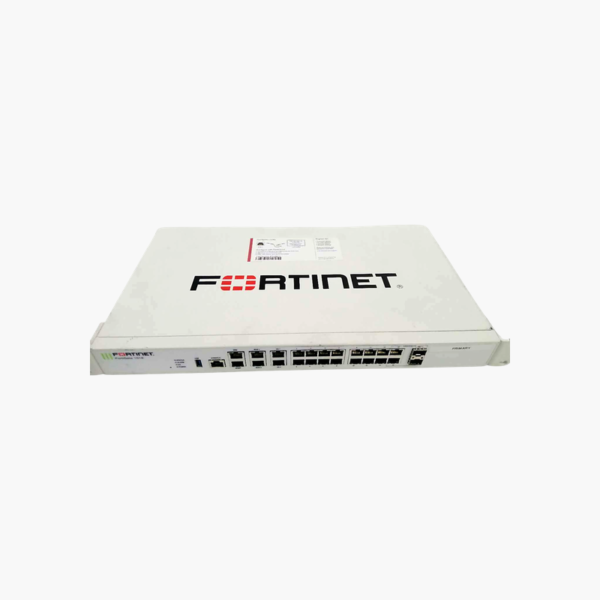
The Fortinet FortiGate 101E (FG-101E-BDL-950-12) is a 1RU rack-mount next-generation firewall that combines threat protection, Secure SD-WAN and IPsec VPN on FortiOS. With 7.4 Gbps firewall and 250 Mbps threat protection throughput, it suits mid-sized businesses, larger branches and campus edges. This bundle includes 1-year FortiGuard UTP services and FortiCare 24×7 support.
Why Basic Routers and Legacy Firewalls Leave Networks Exposed
Most attacks now arrive inside encrypted web traffic, cloud applications and phishing links. A basic router with port filtering cannot see any of that, and older firewalls slow to a crawl when IPS and antivirus inspection are switched on, forcing teams to choose between security and speed.
The FortiGate 101E uses Fortinet’s purpose-built security processors to inspect traffic in hardware. That is why it can sustain 500 Mbps of IPS and 250 Mbps of full threat protection (IPS, antivirus, application control) while still forwarding 7.4 Gbps of firewall traffic.
FortiOS also includes Secure SD-WAN at no extra cost: the firewall measures latency, jitter and packet loss on each internet link and routes applications like Microsoft 365 or VoIP over the best path. Branches connect back to head office with 4 Gbps of IPsec VPN throughput.
1-Year Unified Threat Protection Included
The BDL-950 bundle pairs the FortiGate 101E hardware with 1-year FortiGuard Unified Threat Protection (UTP) and FortiCare 24×7. UTP covers IPS, advanced malware protection, web filtering, DNS filtering, application control and antispam, with signature updates from FortiGuard Labs, and FortiCare 24×7 provides round-the-clock technical support.
480 GB SSD Local Storage for Logging and Reporting
The built-in 480 GB SSD stores traffic, threat and event logs on the appliance, so FortiView dashboards and reports are available without an external log server. This helps smaller IT teams meet audit and compliance requirements.
How to Set Up the Fortinet FortiGate 101E
- Place the appliance on a desk or mount it in a rack, connect power, and connect your internet link to a WAN port.
- Connect a PC to an internal port, open https://192.168.1.99 (the default management address), and sign in with the default admin account to set a new password.
- Run the setup wizard to configure WAN, LAN, DNS and firewall policies, then register the device to activate FortiGuard UTP services included in this bundle.
- Enable security profiles (IPS, antivirus, web filtering, application control), set up SD-WAN and VPN, and upgrade to the recommended FortiOS release.














Reviews
There are no reviews yet.