
Networking
Shop all 595 products
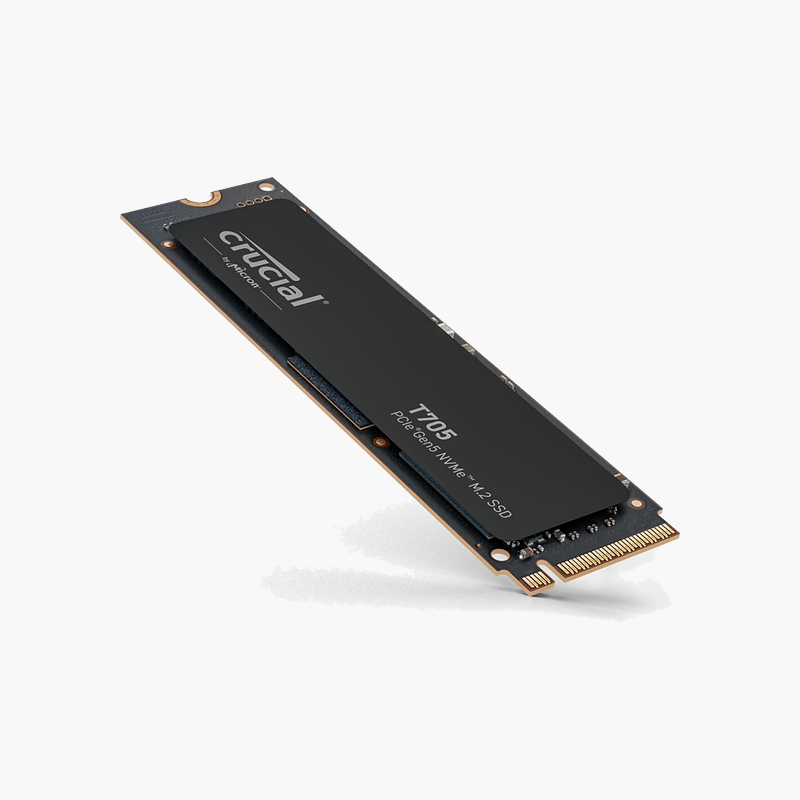
The Crucial T705 1TB (CT1000T705SSD3) is a PCIe 5.0 NVMe M.2 solid state drive with up to 13,600 MB/s read and 10,200 MB/s write. Built for gamers, creators and PC builders, it cuts boot, load and file-transfer times compared with SATA SSDs and hard drives.
Reliable SSD performance for every day.
How PCIe 5.0 NVMe Removes Storage Bottlenecks
Hard drives and SATA SSDs are limited by older interfaces. Hard drives wait on spinning platters, and SATA caps SSDs at about 560 MB/s, so large games, project files and OS updates still take time to load.
The Crucial T705 1TB connects directly to the CPU or chipset over PCIe 5.0 lanes using the NVMe protocol, which handles many parallel requests at once. With up to 13,600 MB/s read and 10,200 MB/s write, it loads games, opens large files and copies data far faster than SATA storage.
PCIe 5.0 doubles per-lane bandwidth over PCIe 4.0. To reach full speed, install it in a PCIe 5.0 M.2 slot on a compatible motherboard; in a PCIe 4.0 slot it still runs at Gen4 speeds.
Speed Where You Notice It
Shorter boot times, faster level loads and quicker exports come from both sequential speed and low random-access latency. It handles everyday multitasking without the stalls of a hard drive.
Simple M.2 Installation
The drive screws into an M.2 slot with no cables; many motherboards include an M.2 heatsink cover that can be used for extra cooling.
Setup Instructions
How to Install the Crucial T705 1TB
- Confirm your motherboard or laptop has a free M.2 2280 slot that supports NVMe (PCIe 5.0 for full speed).
- Power down, unplug and ground yourself, then remove any M.2 slot cover.
- Insert the SSD at an angle into the slot, press it flat and secure it with the screw or latch.
- Boot into BIOS to confirm detection, then initialise the drive in Disk Management or install your OS.







Reviews
There are no reviews yet.