NVIDIA Mellanox ConnectX-4 EN MCX416A-CCAT Dual-Port 100GbE QSFP28 PCIe Network Adapter – PCIe 3.0 x16
NVIDIA Mellanox ConnectX-4 EN MCX416A-CCAT Dual-Port 100GbE QSFP28 PCIe Network Adapter – PCIe 3.0 x16 Price on RequestRequest a quote for volume pricing, availability and lead time.
Back to products
Cisco UCSC-PCIE-C25Q-04 UCS VIC 1455 Quad-Port 10/25G SFP28 PCIe Network Adapter
Cisco UCSC-PCIE-C25Q-04 UCS VIC 1455 Quad-Port 10/25G SFP28 PCIe Network Adapter Price on RequestRequest a quote for volume pricing, availability and lead time.

NVIDIA Mellanox ConnectX-5 EN MCX512A-ACUT Dual-Port 25GbE SFP28 Network Adapter – PCIe 3.0 x8, UEFI

SKU: MCX512A-ACUT
  • 30-Day Hassle Free Returns
  • Secure Payment Options

Price on RequestRequest a quote for volume pricing, availability and lead time.

Key Value Highlights

  • 2 x 25GbE SFP28 ports – Also runs at 10GbE with SFP+ optics or DAC, for a gradual 25G upgrade.
  • ConnectX-5 EN controller – Low latency and hardware offloads for modern data center workloads.
  • RoCE RDMA and NVMe-oF offload – Faster storage access with less CPU overhead.
  • SR-IOV and overlay offload – Efficient networking for VMs, containers and VXLAN/Geneve overlays.
  • UEFI enabled, PCIe 3.0 x8 – Network boot support on modern servers and full bandwidth for both ports.

Description

25GbE with RDMA and overlay offloads for modern virtualized servers.

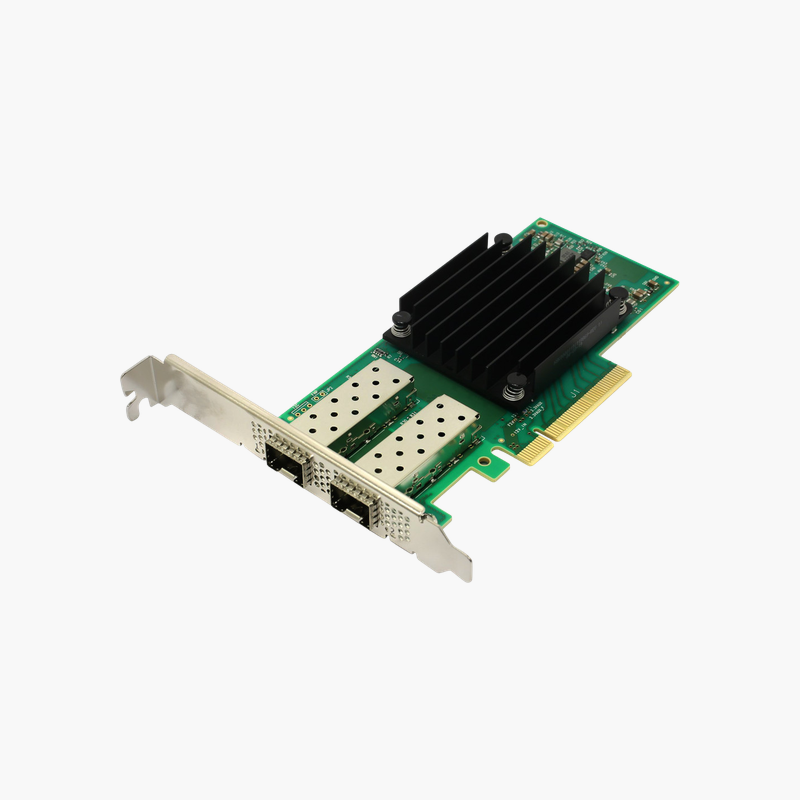
The NVIDIA Mellanox MCX512A-ACUT is a ConnectX-5 EN dual-port 25GbE adapter with two SFP28 ports on PCIe 3.0 x8 and UEFI support. It suits virtualization, cloud and software-defined storage servers moving from 10GbE to 25GbE, with RoCE RDMA and NVMe over Fabrics offloads.

Why 25GbE Is the New Baseline for Server Networking

Modern servers with many cores and fast NVMe storage can easily saturate 10GbE. 25GbE provides 2.5 times the bandwidth per lane and uses the same SFP form factor, so it is the natural upgrade path.

The MCX512A-ACUT provides two 25GbE SFP28 ports on ConnectX-5, with RoCE RDMA and NVMe over Fabrics offloads that cut latency for storage and hyperconverged workloads.

It also runs at 10GbE with SFP+ optics or DAC cables, so it can be installed now and moved to 25G switches later. UEFI support allows network boot on modern servers.

Key Features and Offloads

The MCX512A-ACUT supports roCE RDMA, NVMe over Fabrics offload, SR-IOV, VXLAN/NVGRE/Geneve offload and UEFI enabled. These capabilities reduce CPU overhead and improve consistency for virtualization, cloud and software-defined storage servers.

Installation and Compatibility

It connects through a PCI Express 3.0 x8 and is designed for Servers with a PCIe 3.0 (or 4.0) x8 slot. Supported media: SFP28 DAC, AOC or optical transceivers.

How to Install the NVIDIA Mellanox MCX512A-ACUT

  1. Power down the server, disconnect power, and open the chassis following the server documentation.
  2. Install the adapter in a free 3.0 x8 or wider slot and secure the bracket.
  3. Connect cables or transceivers (SFP28 DAC, AOC or optical transceivers) to your switch, then power on the server.
  4. Install or update the latest drivers and firmware for your operating system or hypervisor, then configure IP addressing, teaming, VLANs or RDMA as needed.

Overview

Model NumberMCX512A-ACUT
Product TypeDual-port 25GbE Ethernet adapter
Ports2 x 25GbE SFP28 (supports 25/10/1GbE)
Data RateUp to 25 Gbps per port
Host InterfacePCI Express 3.0 x8
Compatible SystemsServers with a PCIe 3.0 (or 4.0) x8 slot
Media / CablingSFP28 DAC, AOC or optical transceivers
Key FeaturesRoCE RDMA, NVMe over Fabrics offload, SR-IOV, VXLAN/NVGRE/Geneve offload, UEFI enabled
Controller / Part InfoConnectX-5 EN controller, tall bracket
Hot-SwappableNo (install with system powered off)
Operating SystemsWindows Server, Linux, VMware ESXi (driver dependent)
Form Factor DetailsPCIe add-in card

Frequently Asked Questions

Find answers to common questions about this product.

Customer Reviews

Reviews

There are no reviews yet.

Be the first to review “NVIDIA Mellanox ConnectX-5 EN MCX512A-ACUT Dual-Port 25GbE SFP28 Network Adapter – PCIe 3.0 x8, UEFI”

Your email address will not be published. Required fields are marked *