
Networking
Shop all 595 products


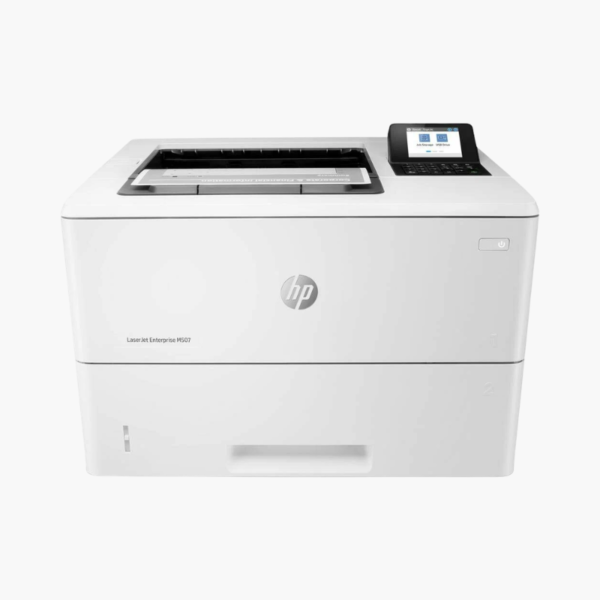
The HP LaserJet Enterprise M507dn is a monochrome laser printer for enterprise workgroups and departments with high print volumes and managed networks. It prints at 45 ppm with automatic duplex, holds 650 sheets, and connects through built-in Ethernet with enterprise-grade security features.
Deep-Dive Story & Problem/Solution
Enterprise Printing Demands Security and Uptime, Not Just Speed
In larger organisations a printer is a network endpoint. It must be managed centrally, protected against tampering, and able to run for months between service interventions. Consumer-class devices meet none of those requirements.
The M507dn belongs to HP’s Enterprise line, with embedded security features, firmware protection, and compatibility with HP fleet management tools. IT can configure, monitor, and update it remotely.
Mechanically it is built for volume: 45 ppm, a first page in about 5.9 seconds, 1200 x 1200 dpi output, and a duty cycle of up to 150,000 pages a month with a recommended volume of around 7,500.
Department-Level Throughput
A 550-sheet tray and 100-sheet multipurpose tray provide 650 sheets of input, and the output bin holds 250 sheets. Automatic two-sided printing is standard.
Low Intervention Operation
Three toner options, HP 89A, 89X, and 89Y, yield roughly 5,000, 10,000, and 20,000 pages. A 2.7-inch display with keypad supports PIN release of confidential jobs.
Setup Instructions
How to Set Up the HP LaserJet Enterprise M507dn
- Unpack the printer and remove shipping tape and toner seals.
- Load paper in the 550-sheet tray and connect power and Ethernet.
- Assign network settings on the control panel or via DHCP.
- Deploy the HP universal print driver and print a configuration page.











Reviews
There are no reviews yet.