
Networking
Shop all 595 products

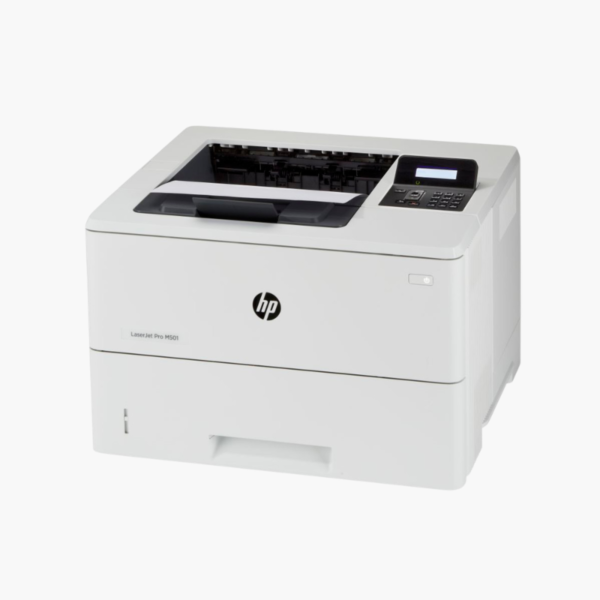
The HP LaserJet Pro M501dn is a monochrome laser printer for workgroups that print thousands of pages a month. It runs at 45 ppm, holds 650 sheets as standard, duplexes automatically, and connects by Ethernet or USB for reliable, managed office use.
Deep-Dive Story & Problem/Solution
High-Volume Printing Wears Out Light-Duty Printers
Departments that print pick lists, patient forms, legal documents, or statements all day put loads on a printer that entry-level models are not built for. Rollers wear, trays empty every hour, and the device spends more time being attended to than printing.
The M501dn is rated for a monthly duty cycle of up to 100,000 pages, with a recommended range of 1,500 to 6,000 pages. Its 550-sheet main tray and 100-sheet multipurpose tray hold more than a ream combined.
The engine prints at 45 ppm with the first page out in about 5.7 seconds. HP 87A and high-yield 87X toner cartridges keep per-page costs and interventions low.
Departmental Speed and Capacity
A 250-sheet output bin collects long jobs. Automatic duplex printing is standard, and HP FastRes technology provides fine text and graphics from a 600 dpi engine.
Managed and Mobile-Ready
Gigabit-capable Ethernet and USB connect the printer, while Apple AirPrint, HP ePrint, and Mopria support mobile devices. A two-line LCD with keypad allows PIN-protected printing.
Setup Instructions
How to Set Up the HP LaserJet Pro M501dn
- Unpack the printer, remove tape, and pull the sealing strip from the toner cartridge.
- Load paper into the 550-sheet tray and adjust the guides.
- Connect power and an Ethernet cable, then set the IP configuration on the control panel if needed.
- Install the driver on client computers and print a configuration page.















Reviews
There are no reviews yet.