
Networking
Shop all 595 products

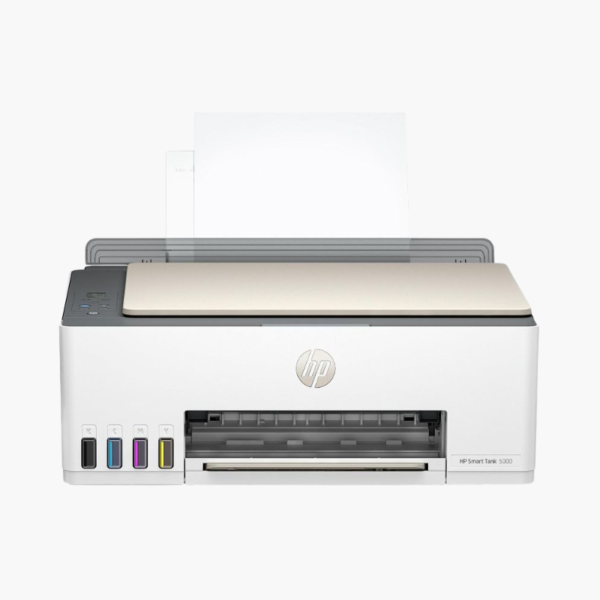
The HP Smart Tank 5000 is a wireless all-in-one ink tank printer for families and home users who print regularly and want low running costs. It prints, copies, and scans, and uses refillable HP 31 and 32XL ink bottles in place of cartridges.
Deep-Dive Story & Problem/Solution
Cartridge Costs Make Home Printing More Expensive Than the Printer Itself
A typical cartridge inkjet is cheap to buy and costly to feed. Standard cartridges hold only a few millilitres of ink, so a household that prints school projects, forms, and photos replaces them constantly.
The Smart Tank 5000 stores ink in four built-in tanks fed from bottles: a 135 ml HP 32XL black bottle and 50 ml HP 31 cyan, magenta, and yellow bottles. Each bottle yields thousands of pages, which brings the cost per page down sharply.
Print speeds are up to 10 ppm in black and 5 ppm in color (ISO), suited to steady home use. Recommended volume is 200 to 800 pages a month.
Low-Cost, High-Volume Home Printing
Transparent tanks show ink levels at a glance. Resolution reaches 1200 x 1200 rendered dpi in black and up to 4800 x 1200 optimized dpi in color for documents and borderless photos.
Simple Controls and Reliable Wireless
Smart-guided buttons light up only when relevant, and an icon LCD shows status. Self-healing Wi-Fi, Wi-Fi Direct, AirPrint, and Mopria make mobile printing straightforward.
Setup Instructions
How to Set Up the HP Smart Tank 5000
- Remove packing materials and open the ink tank covers.
- Fill each tank with the matching HP 31 or 32XL bottle, then install the two printheads.
- Load paper in the rear tray, switch the printer on, and let it prime the ink system.
- Use the HP Smart app to connect to Wi-Fi and complete alignment.














Reviews
There are no reviews yet.