
Networking
Shop all 595 products
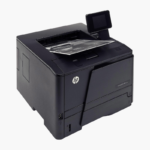

The HP Color LaserJet Pro MFP 4301fdw is a wireless color laser all-in-one for small and medium businesses. It prints at 35 ppm in black and color, scans two-sided pages through a 50-page ADF, and includes copy and fax with a 4.3-inch touchscreen.
Deep-Dive Story & Problem/Solution
Growing Teams Outgrow Entry-Level Color Printers Quickly
A color printer that suited three people struggles with ten. Jobs queue, the tray empties several times a day, and color consistency drifts on long runs. Buying a second small printer doubles the supplies and maintenance.
The 4301fdw is built for that next stage. Its laser engine delivers 35 ppm for both black and color, with the first page out in roughly 9 to 10 seconds, and a recommended monthly volume ceiling far above entry models.
Paper handling includes a 250-sheet main tray, a 50-sheet multipurpose tray, and a 150-sheet output bin. Automatic duplex printing and a 50-page duplex-scanning ADF are standard.
Workgroup-Speed Color Laser Printing
Toner-based color resists smudging and prints consistently, making it suitable for client documents and internal reports alike. HP 210A and 210X cartridges offer standard and high-yield options.
Scanning, Copying, and Fax From One Touchscreen
Scan to email, network folders, or cloud from the 4.3-inch panel. Apple AirPrint and Mopria support mobile devices, and Ethernet integrates the device with managed networks.
Setup Instructions
How to Set Up the HP Color LaserJet Pro MFP 4301fdw
- With two people, lift the 45 lb printer from the box and remove all packing material.
- Load paper in the 250-sheet tray and connect power, Ethernet, and a phone line for fax if required.
- Follow the touchscreen prompts to set language, network, and date.
- Install drivers on each computer and print a test page.












Reviews
There are no reviews yet.