
Networking
Shop all 595 products

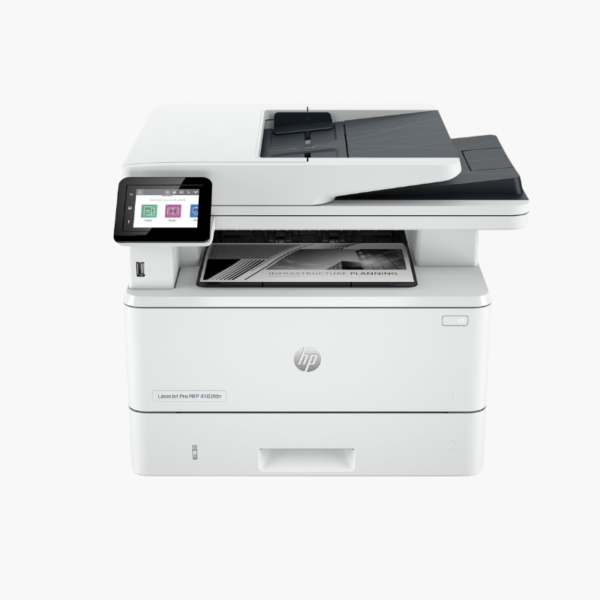
The HP LaserJet Pro MFP 4101fdn is a wired monochrome laser multifunction printer for small and medium offices. It prints at 42 ppm and scans, copies, and faxes through a 50-sheet ADF, connecting by Ethernet or USB for stable, managed operation.
Deep-Dive Story & Problem/Solution
Offices That Avoid Wi-Fi Still Need a Full Multifunction Device
Legal, medical, and finance offices often restrict wireless devices. They still need to print, scan signed documents to a network folder, copy case files, and send the occasional fax.
The 4101fdn provides all four functions over a wired Ethernet connection. There is no wireless radio to configure or audit.
It prints at 42 ppm with a first page in about 6.1 seconds at 1200 x 1200 dpi. Automatic duplex applies to printing, scanning, and copying, and the monthly duty cycle is up to 80,000 pages.
Fast Print and Duplex Scan
Standard input is 350 sheets from a 250-sheet tray and 100-sheet multipurpose tray. The 50-sheet ADF feeds two-sided documents without user intervention.
Straightforward Control and Supplies
A 2.7-inch color touchscreen offers scan-to-email and folder shortcuts. HP 148A and 148X toner yield about 2,900 and 9,500 pages.
Setup Instructions
How to Set Up the HP LaserJet Pro MFP 4101fdn
- Unpack the device and remove packing materials and the toner seal.
- Load paper, then connect power, Ethernet, and a phone line for fax.
- Complete the initial setup on the touchscreen.
- Install drivers, configure scan-to-folder or email, and run a test print and scan.















Reviews
There are no reviews yet.