
Networking
Shop all 595 products

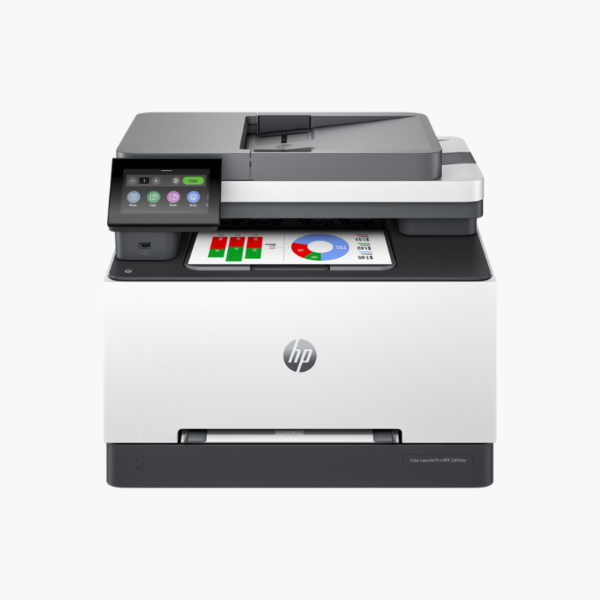
The HP Color LaserJet Pro MFP 3301fdw is a wireless color laser all-in-one for small teams that need professional color documents. It prints at 26 ppm in black and color, scans two-sided originals through a 50-sheet ADF, and adds copy and fax in one compact unit.
Deep-Dive Story & Problem/Solution
Color Documents Are Slow and Smudge-Prone on the Wrong Printer
Small businesses often print color proposals and labels on an inkjet, then deal with slow output, pages that smear under a highlighter, and cartridges that dry out between jobs. Outsourcing color work is the usual fallback, at a cost per page that adds up.
The 3301fdw uses laser toner fused to the page. Prints come out dry, resist smudging, and do not degrade when the printer sits idle. HP TerraJet toner is formulated for a wider color range and lower fusing energy than earlier HP toner.
At 26 ppm for both black and color, with automatic two-sided printing and a 250-sheet tray, it keeps pace with a team of several users.
Fast, Durable Color Laser Output
Text is sharp at small sizes and color charts print consistently from the first page to the last, which suits client-facing documents.
Document Workflow in One Device
A 50-sheet ADF scans both sides automatically. Scan to email or cloud destinations from the touchscreen, copy multi-page sets, and send faxes without a separate machine.
Setup Instructions
How to Set Up the HP Color LaserJet Pro MFP 3301fdw
- Unpack the printer, remove orange tape and packing material, and confirm the preinstalled toner cartridges are seated.
- Load letter or A4 paper into the 250-sheet tray and plug in the power cord.
- Connect by Ethernet, or use the HP Smart app to join the printer to Wi-Fi.
- Install the driver when prompted, then print a configuration page and send a test scan.















Reviews
There are no reviews yet.