
Networking
Shop all 595 products

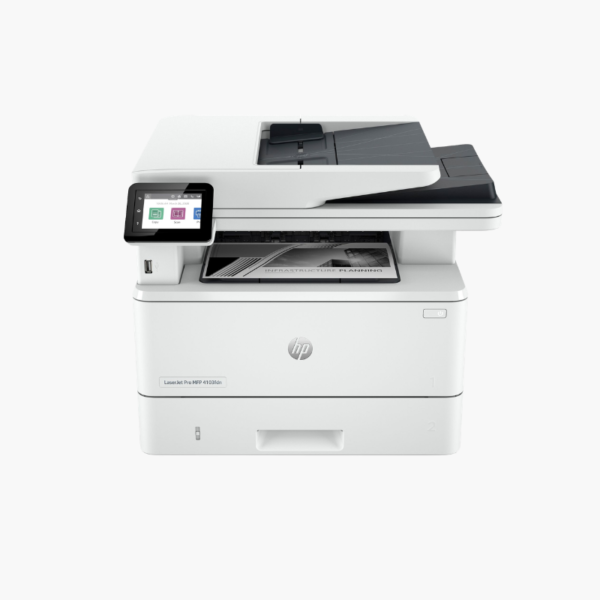
The HP LaserJet Pro MFP 4101fdw is a monochrome laser all-in-one for small and medium workgroups. It prints at 42 ppm, scans two-sided documents in a single pass through a 50-sheet ADF, and adds copy and fax with wireless and Ethernet networking.
Deep-Dive Story & Problem/Solution
A Shared Office Printer Becomes a Bottleneck When It Is Too Slow
When ten people share one device, speed and capacity decide whether work flows or queues. A 20 ppm machine with a small tray produces a line at the printer, frequent refills, and scans that take minutes for double-sided files.
The 4101fdw runs at 42 ppm with the first page out in about 6.1 seconds. Standard input is 350 sheets across a 250-sheet tray and a 100-sheet multipurpose tray, with a 150-sheet output bin. It is rated for up to 80,000 pages a month.
Its 50-sheet ADF scans both sides of a page in one pass, so digitising contracts and records takes half the time of reversing-feeder designs.
High-Speed Mono Printing at 1200 dpi
Text and fine graphics print cleanly at 1200 x 1200 dpi. Automatic duplex printing is standard, and HP 148A or 148X toner offers yields of roughly 2,900 or 9,500 pages.
Efficient Scanning and Device Management
The 2.7-inch color touchscreen provides scan-to-email, folder, and cloud shortcuts. Apple AirPrint, Mopria, Wi-Fi Direct, and the HP Smart app support mobile users.
Setup Instructions
How to Set Up the HP LaserJet Pro MFP 4101fdw
- Unpack the printer, remove packing materials, and check the preinstalled toner cartridge.
- Load paper into Tray 2 and connect the power cord and phone line if using fax.
- Connect to the network by Ethernet or Wi-Fi using the touchscreen or HP Smart app.
- Install drivers, configure scan destinations, and print a test page.














Reviews
There are no reviews yet.