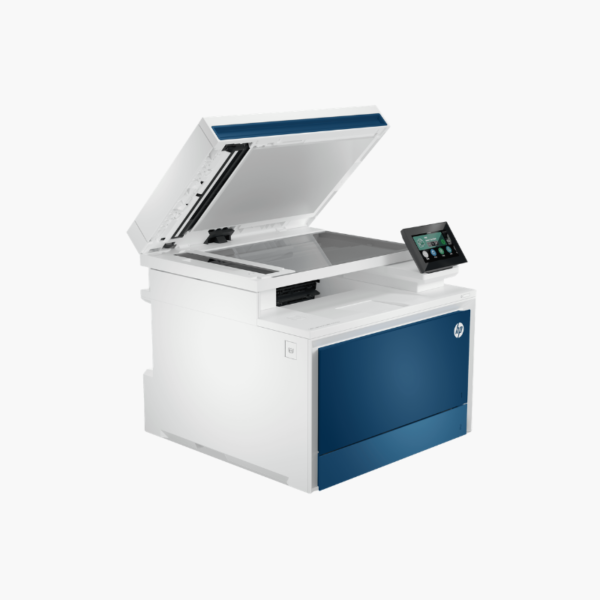
HP Color LaserJet Pro MFP 4301fdn Color Laser All-in-One – Print, Scan, Copy, Fax, 35 ppm, Ethernet

SKU: HP-COLOR-LASERJET-PRO-MFP-4301FDN
  • 30-Day Hassle Free Returns
  • Secure Payment Options

Price on RequestRequest a quote for volume pricing, availability and lead time.

Key Value Highlights

  • 35 ppm in black and color – Delivers workgroup-level speed.
  • Print, scan, copy, and fax – Centralises office document tasks.
  • 50-page ADF with duplex scanning – Scans two-sided originals automatically.
  • Ethernet and USB – Offers a stable wired connection for secure networks.
  • 4.3-inch color touchscreen – Makes scan and copy workflows quick to run.

Description

The HP Color LaserJet Pro MFP 4301fdn is a wired color laser all-in-one for small and medium businesses. It prints at 35 ppm in black and color, and scans, copies, and faxes through a 50-page duplex ADF, connecting by Ethernet or USB.

Deep-Dive Story & Problem/Solution

Regulated Offices Need Color Multifunction Without Wireless

Businesses handling sensitive data often prohibit Wi-Fi on shared devices. They still want fast color output, duplex scanning to network folders, and fax in one unit.

The 4301fdn delivers those functions over Ethernet. It prints 35 ppm in both black and color, with the first page out in roughly 9 to 10 seconds, and duplexes prints, copies, and scans automatically.

Input comes from a 250-sheet tray and a 50-sheet multipurpose tray, with a 150-sheet output bin.

Fast Color Print With Duplex Scan

The 50-page ADF and 600 dpi optical flatbed convert paper files to digital quickly. HP 210A and 210X toner provide standard and high-yield options.

Central Control Panel

A 4.3-inch touchscreen gives access to scan destinations, copy presets, and fax. AirPrint and Mopria allow mobile printing through the wired network.

Setup Instructions

How to Set Up the HP Color LaserJet Pro MFP 4301fdn

  1. With two people, lift the 45 lb unit into place and remove packing material.
  2. Load paper and connect power, Ethernet, and a phone line for fax.
  3. Complete setup on the touchscreen.
  4. Install drivers, configure scan destinations, and print a test page.

Overview

ModelHP Color LaserJet Pro MFP 4301fdn
FunctionsPrint, scan, copy, fax
Print TechnologyColor laser
Print SpeedUp to 35 ppm black and color
First Page OutApprox. 9.1 seconds black, 10 seconds color
Paper Input250-sheet tray + 50-sheet multipurpose tray
Output Capacity150 sheets
Automatic Document Feeder50 pages with duplex scanning
Duplex PrintingAutomatic
Scan Resolution600 dpi optical
ConnectivityEthernet, USB 2.0
Control Panel4.3-inch color touchscreen
TonerHP 210A / 210X (black, cyan, magenta, yellow)
Maximum Paper Size8.5 x 14 inches (legal)
Dimensions and Weight16.6 x 17.1 x 15.1 inches; 45 lbs
MaintenanceReplace toner cartridges individually; clean scanner glass periodically

Frequently Asked Questions

Find answers to common questions about this product.

Customer Reviews

Reviews

There are no reviews yet.

Be the first to review “HP Color LaserJet Pro MFP 4301fdn Color Laser All-in-One – Print, Scan, Copy, Fax, 35 ppm, Ethernet”

Your email address will not be published. Required fields are marked *