
Networking
Shop all 595 products
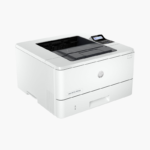

The HP LaserJet M110w is one of HP’s smallest monochrome laser printers, built for individuals and small teams with limited desk space. It prints up to 21 ppm, connects over Wi-Fi or USB, and works with the HP Smart app for mobile printing.
Deep-Dive Story & Problem/Solution
Occasional Printing Kills Inkjet Cartridges
Many home users print a few pages a week. Inkjet nozzles dry out at that pace, so the first job after a quiet month is a cleaning cycle, wasted ink, or a new cartridge.
A laser printer avoids the problem entirely. The M110w fuses dry toner to the page, so it prints cleanly whether it was last used yesterday or two months ago. The first page appears in about 8.3 seconds.
The body is small and light at 8.4 lbs, yet output reaches 21 ppm at 600 x 600 dpi, and the monthly duty cycle is up to 8,000 pages.
Small Footprint, Laser Quality
Crisp black text suits letters, forms, shipping labels, and coursework. The 150-sheet input tray and 100-sheet output bin are sized for personal use.
Quick Wireless Setup
Apple AirPrint, Mopria, Wi-Fi Direct, and the HP Smart app handle printing from phones and tablets. Simple LED indicators and buttons keep operation straightforward.
Setup Instructions
How to Set Up the HP LaserJet M110w
- Unpack the printer and remove tape and the cartridge sealing tab.
- Load paper in the input tray and plug in the power cord.
- Open the HP Smart app and follow the steps to connect the printer to Wi-Fi.
- Print a test page from your phone or computer.














Reviews
There are no reviews yet.