
Networking
Shop all 595 products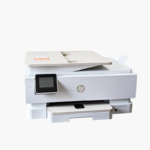

The HP OfficeJet Pro 9730e is a wide format color inkjet all-in-one for architects, engineers, accountants, and small offices that work with 11 x 17-inch documents. It prints, scans, and copies tabloid pages, with two 250-sheet trays and automatic duplex printing.
Deep-Dive Story & Problem/Solution
Letter-Size Printers Force Large Documents to Be Shrunk or Outsourced
Floor plans, wide spreadsheets, schedules, and marketing layouts do not fit on letter paper. Offices either shrink them until the detail is unreadable, tile several sheets together, or send them to a print shop and wait.
The OfficeJet Pro 9730e prints, scans, and copies at up to 11 x 17 inches. Two 250-sheet trays let you load tabloid paper in one and letter in the other, so switching size needs no reloading.
On standard pages the printer reaches up to 22 ppm in black and 18 ppm in color, with automatic two-sided printing. HP 936 series pigment inks produce water- and highlighter-resistant documents.
True Wide Format Print, Scan, and Copy
Full 11 x 17 output shows line drawings and large tables at readable scale. The 1200 dpi optical scanner captures large originals for archiving and sharing.
Office-Ready Handling and Connectivity
A 4.3-inch color touchscreen provides scan and copy shortcuts. Ethernet, Wi-Fi, and USB connections with HP Smart app support cover desktops and mobile devices.
Setup Instructions
How to Set Up the HP OfficeJet Pro 9730e
- Place the printer on a wide, stable surface and remove all packing materials.
- Install the four HP 936 setup cartridges and load letter and 11 x 17 paper in the two trays.
- Connect via Ethernet or use the HP Smart app to join Wi-Fi.
- Confirm paper sizes on the touchscreen and print an alignment page.














Reviews
There are no reviews yet.