Canon Color imageCLASS LBP632Cdw Wireless Color Laser Printer – 22 ppm, Auto Duplex, Gigabit Ethernet
Canon Color imageCLASS LBP632Cdw Wireless Color Laser Printer – 22 ppm, Auto Duplex, Gigabit Ethernet Price on RequestRequest a quote for volume pricing, availability and lead time.
Back to products
Canon PIXMA TS9521Ca Wireless Crafting All-in-One Printer – 12 x 12 Borderless, 11 x 17 Printing, ADF
Canon PIXMA TS9521Ca Wireless Crafting All-in-One Printer – 12 x 12 Borderless, 11 x 17 Printing, ADF Price on RequestRequest a quote for volume pricing, availability and lead time.

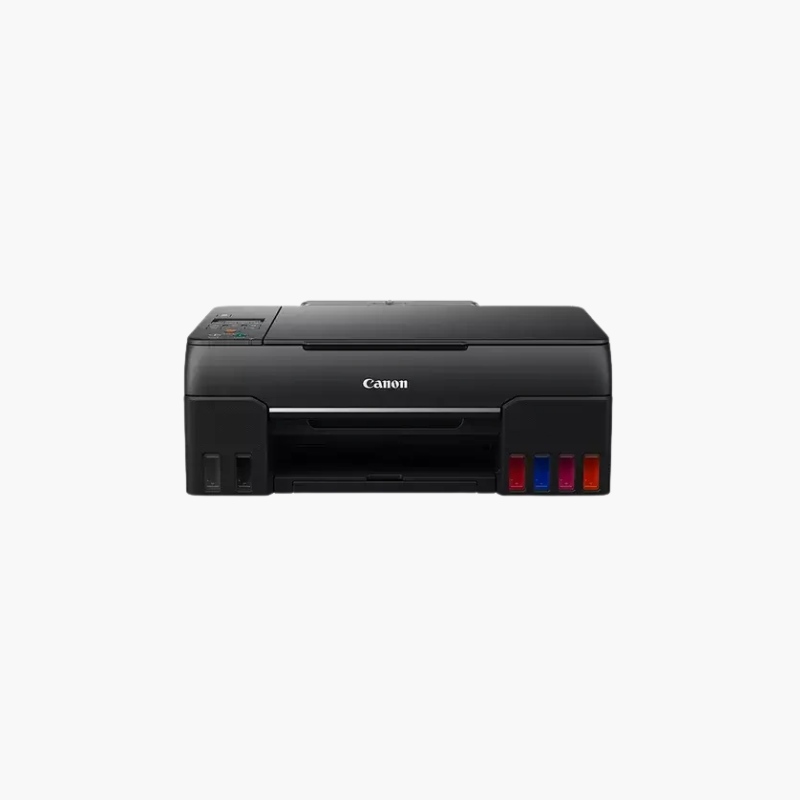
Canon PIXMA G620 Wireless MegaTank Photo All-in-One Printer – 6-Color Refillable Ink, Print, Copy, Scan

SKU: CANON-PIXMA-G620
  • 30-Day Hassle Free Returns
  • Secure Payment Options

Price on RequestRequest a quote for volume pricing, availability and lead time.

Key Value Highlights

  • 6-color dye ink system – Adds red and gray inks for wider color and smoother tones.
  • Up to 3,800 4 x 6 photos per ink set – Lowers the cost of printing photos at home.
  • Refillable MegaTank bottles – Keyed nozzles prevent filling the wrong tank.
  • Print, copy, and scan – Covers documents as well as photo work.
  • Wi-Fi and USB – Prints from computers and mobile devices.

Description

The Canon PIXMA G620 is a wireless MegaTank photo all-in-one printer for families, crafters, and photo enthusiasts. Its six-color refillable dye ink system prints up to 3,800 4 x 6-inch photos per bottle set, with a borderless 4 x 6 print in about 47 seconds, plus flatbed copy and scan functions.

Deep-Dive Story & Problem/Solution

Printing Photos at Home Uses Ink Faster Than Most Budgets Allow

Cartridge-based photo printers produce good results, but a few dozen prints can empty a set of cartridges. That cost discourages people from printing the pictures they take.

The G620 replaces cartridges with six GI-23 ink bottles: cyan, magenta, yellow, black, red, and gray. One set prints thousands of photos, so albums, craft projects, and wall prints stay affordable.

The additional red and gray inks extend the color range and improve black-and-white prints compared with four-color tank printers.

Photo Sizes and Media

Borderless printing is supported from 3.5 x 3.5 inches up to letter size, with square formats, magnetic photo paper, and restickable paper among the options.

Everyday All-in-One Use

A 100-sheet rear tray and a flatbed scanner at 600 x 1200 dpi handle homework, forms, and copies between photo jobs.

Setup Instructions

How to Set Up the Canon PIXMA G620

  1. Install the print heads and fill each tank with its matching GI-23 bottle.
  2. Power on and let the ink system initialize.
  3. Connect by Wi-Fi with the Canon PRINT app or by USB, then install the driver.
  4. Load photo paper in the rear tray and print a nozzle check.

Overview

ModelCanon PIXMA G620
Printer TypeMegaTank photo inkjet all-in-one
FunctionsPrint, copy, scan
Ink System6-color dye (C, M, Y, K, red, gray)
InkCanon GI-23 bottles
Photo YieldUp to 3, 800 4 x 6-inch photos per set
Print SpeedApprox. 3.9 ipm; 4 x 6 photo in approx. 47 seconds
Print ResolutionUp to 4800 x 1200 dpi
Paper Capacity100-sheet rear tray
Maximum Paper Size8.5 x 14 inches (legal)
ScannerFlatbed, 600 x 1200 dpi
ConnectivityWi-Fi, USB
Dimensions17.2 x 12.5 x 5.8 inches
Weight17.4 lbs
MaintenanceRefill tanks before low line; print regularly

Frequently Asked Questions

Find answers to common questions about this product.

Customer Reviews

Reviews

There are no reviews yet.

Be the first to review “Canon PIXMA G620 Wireless MegaTank Photo All-in-One Printer – 6-Color Refillable Ink, Print, Copy, Scan”

Your email address will not be published. Required fields are marked *