
Networking
Shop all 595 products
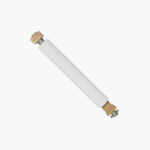
The Zebra P1037974-028 Platen Roller Kit is a replacement platen roller for Zebra ZT210, ZT220, and ZT230 industrial label printers. The platen is the rubber drive roller that presses labels against the printhead, and replacing a worn one restores even print darkness, accurate feeding, and readable barcodes.
Deep-Dive Story & Problem/Solution
A Worn Platen Roller Causes Faded Print and Label Drift
After many kilometres of labels, the rubber surface of a platen roller hardens, glazes, or picks up cuts from blades used to clear jams. Print becomes light on one side and labels start to skew.
Operators often raise darkness settings to compensate, which shortens printhead life without fixing the cause. Replacing the roller restores uniform pressure across the label width.
This kit supplies the correct roller for the ZT200 series platform, so the printer returns to its original feeding and print quality.
Compatible Printers
Zebra ZT210, ZT220, and ZT230, and the later ZT211 and ZT231 models, in both direct thermal and thermal transfer configurations.
Part of Routine Maintenance
Zebra recommends inspecting the platen whenever the printhead is cleaned and replacing it when wear, cuts, or flat spots are visible.
Setup Instructions
How to Replace the Platen Roller on a ZT200 Series Printer
- Switch off the printer, disconnect power, and remove media and ribbon.
- Open the printhead and release the platen bearing latches at each end.
- Lift out the worn roller and seat the new roller with its gear and bearings in the same orientation.
- Lock the latches, reload media, and run a calibration and test label.















Reviews
There are no reviews yet.