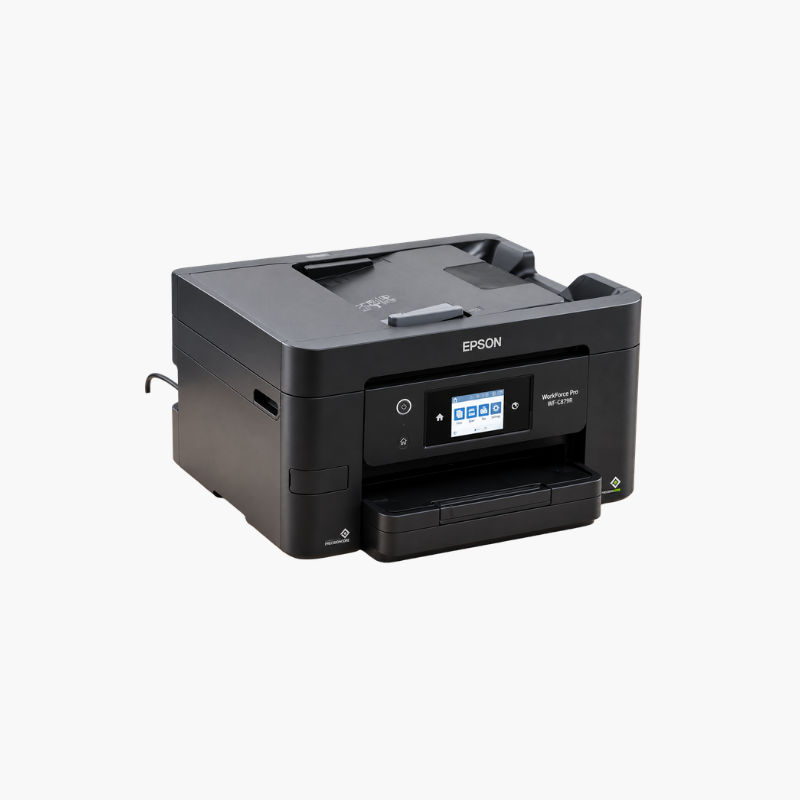
Epson WorkForce Pro WF-3820 Wireless All-in-One Printer – Auto 2-Sided Printing, 35-Page ADF, 250-Sheet Tray

SKU: EPSON-WORKFORCE-PRO-WF-3820
  • 30-Day Hassle Free Returns
  • Secure Payment Options

Price on RequestRequest a quote for volume pricing, availability and lead time.

Key Value Highlights

  • 21 ISO ppm black, 11 ISO ppm color – Prints quickly with no warm-up.
  • Print, copy, scan, and fax – Provides all four office functions.
  • 35-page automatic document feeder – Feeds multi-page originals.
  • 250-sheet tray and automatic duplex – Suits daily home-office workloads.
  • DURABrite Ultra pigment ink – Produces durable, smudge-resistant documents.

Description

The Epson WorkForce Pro WF-3820 is a wireless color inkjet all-in-one for home offices and small businesses. It delivers 21 ISO ppm in black, automatic two-sided printing, a 35-page ADF, a 250-sheet tray, and print, copy, scan, and fax functions.

Deep-Dive Story & Problem/Solution

Small Businesses Need Dependable, Professional Documents Every Day

Invoices, quotes, and contracts represent a business to its customers. Faded ink, smeared text, or a printer that cannot keep up with a busy morning undermines that impression.

The WF-3820 uses DURABrite Ultra pigment ink, which bonds to plain paper for sharp, water- and smudge-resistant text. Epson 822 cartridges are individual, so only the empty color is replaced.

PrecisionCore Heat-Free printing reaches 21 ISO ppm in black and 11 in color and starts immediately, without the warm-up delay of a laser.

Productive Paper Handling

The 250-sheet tray and automatic duplex reduce interruptions. A 35-page ADF handles copying, scanning, and faxing of multi-page documents.

Straightforward Setup and Sharing

A 2.7-inch color touchscreen guides tasks. Wi-Fi, Wi-Fi Direct, and Ethernet are built in, with the Epson Smart Panel app for mobile control.

Setup Instructions

How to Set Up the Epson WorkForce Pro WF-3820

  1. Remove packing tape and connect the power cord.
  2. Install the four 822 cartridges and let the ink charge.
  3. Load paper in the 250-sheet tray.
  4. Connect to the network and attach a phone line for fax.

Overview

ModelEpson WorkForce Pro WF-3820
FunctionsPrint, copy, scan, fax
Print TechnologyPrecisionCore Heat-Free inkjet
Print Speed21 ISO ppm black, 11 ISO ppm color
InkEpson 822 / 822XL DURABrite Ultra pigment
Paper Input250-sheet tray
Automatic Document Feeder35 pages, single-sided
Duplex PrintingAutomatic
ConnectivityWi-Fi, Wi-Fi Direct, Ethernet, USB
Mobile PrintingMopria, Epson Smart Panel
Control Panel2.7-inch color touchscreen
Number of Cartridges4 individual
Warm-Up TimeNone (Heat-Free technology)
In the BoxPrinter, ink cartridges, power cord, setup guide
MaintenanceReplace individual cartridges; run head cleaning as needed

Frequently Asked Questions

Find answers to common questions about this product.

Customer Reviews

Reviews

There are no reviews yet.

Be the first to review “Epson WorkForce Pro WF-3820 Wireless All-in-One Printer – Auto 2-Sided Printing, 35-Page ADF, 250-Sheet Tray”

Your email address will not be published. Required fields are marked *