
Networking
Shop all 595 products
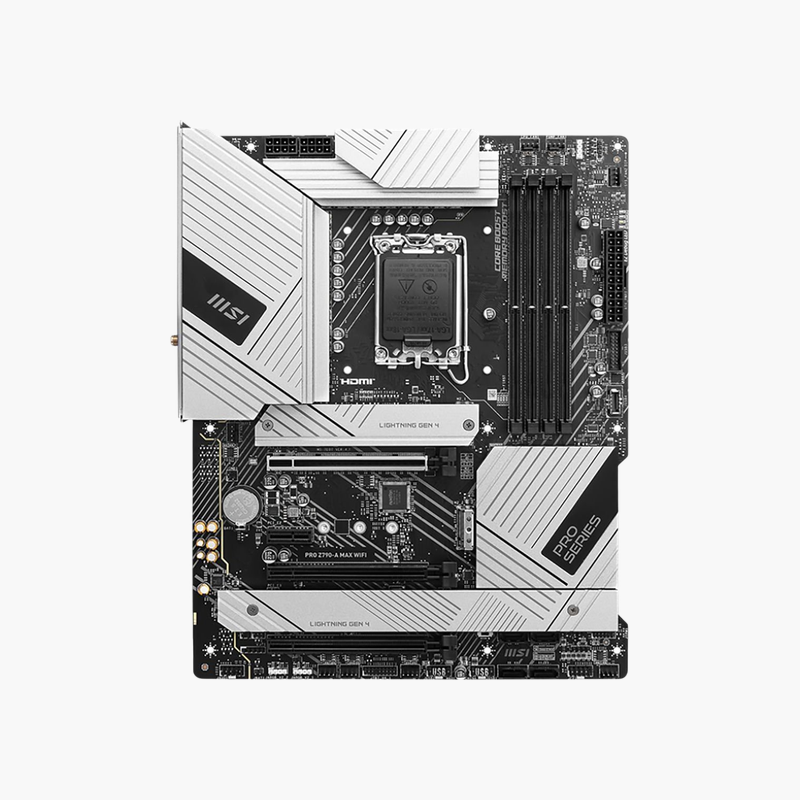
A refreshed Z790 board with Wi-Fi 7 and plenty of storage for productive 14th Gen builds.
The MSI PRO Z790-A MAX WiFi is an ATX motherboard for Intel 12th, 13th and 14th Gen processors on LGA 1700. It supports DDR5 up to 256GB, a PCIe 5.0 graphics slot, four PCIe 4.0 M.2 slots, six SATA ports, Wi-Fi 7 and Intel 2.5G LAN. It fits professionals, creators and gamers.
Storage and Connectivity for Work-Focused Intel Builds
Many gaming-branded boards spend budget on RGB and styling while cutting SATA ports or using basic network controllers. For a workstation or productivity PC, storage count and reliable networking matter more.
The PRO Z790-A MAX WiFi provides four PCIe 4.0 x4 M.2 slots and six SATA 6Gb/s ports, enough for an OS drive, project SSDs and large hard drives in one system. The MAX refresh adds Wi-Fi 7 and an updated BIOS for 14th Gen processors out of the box.
PCIe 5.0 Graphics and Flexible Expansion
The top x16 slot runs at PCIe 5.0 from the CPU. Additional slots include PCIe 4.0 x4 and two PCIe 3.0 x1 for capture cards, network cards or controllers. The 16 Duet Rail power system and large heatsinks support unlocked K-series processors.
Rear I/O and Audio
The rear panel offers a USB 20Gbps Type-C port, three 10Gbps Type-A, two 5Gbps Type-A and two USB 2.0 ports, plus HDMI 2.1 and DisplayPort 1.4 for integrated graphics. Realtek ALC4080 7.1 audio with S/PDIF output handles headsets and studio monitors.
Setup Instructions
How to Install the MSI PRO Z790-A MAX WiFi
- Install the LGA 1700 processor, DDR5 memory (A2 and B2 for two sticks) and M.2 SSDs under the M.2 shields.
- Mount the board in an ATX case and connect the 24-pin ATX, CPU power and front-panel headers.
- Install the graphics card in the PCIe 5.0 x16 slot, attach the Wi-Fi 7 antenna and power on into the BIOS.
- Enable XMP, update the BIOS using M-Flash or Flash BIOS Button, and install MSI chipset, LAN and Wi-Fi drivers.





Reviews
There are no reviews yet.